

- Updated: March 11, 2026
- 6 min read
UBOS Tech Reviews the $600 MacBook Neo: Performance, Design, and Value
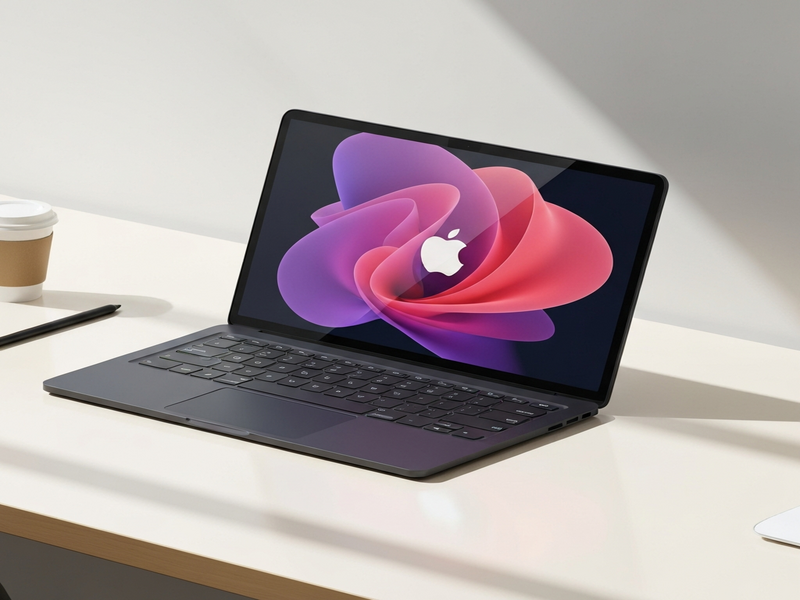
The MacBook Neo is a $600‑priced laptop that runs on Apple’s A18 Pro chip, delivering desktop‑class performance, a bright Retina display, and solid battery life in a compact, affordable package.
Apple’s latest budget Mac, the MacBook Neo, was unveiled in March 2026 and quickly became the talk of the tech community. For a full rundown of the original announcement, see the original Daring Fireball story. This article breaks down the Neo’s specifications, compares it with existing Macs and iPads, and explains why it matters to tech enthusiasts and professionals looking for an affordable high‑performance laptop.
MacBook Neo Specs & Performance
Core Hardware
- Apple A18 Pro SoC (same silicon as the 2024 iPhone 16 Pro)
- 8 GB unified memory (LPDDR5)
- 256 GB or 512 GB SSD options (NVMe)
- 13.0‑inch Retina display, 2560 × 1600, 500 nits brightness
- Two USB‑C ports (one Thunderbolt 4, one USB 2.0)
- 20 W USB‑C power adapter (compatible with higher‑wattage chargers)
- Integrated 1080p FaceTime camera, stereo side‑firing speakers
Performance Benchmarks
- Geekbench 6 (single‑core): ~2,300 points – on par with the M1 MacBook Air
- Geekbench 6 (multi‑core): ~7,800 points – comparable to a 2020 M1 MacBook Air
- Battery life: up to 14 hours of web browsing or video playback
- Thermal design: fan‑less, stays under 45 °C under sustained load
How the Neo Stacks Up Against Other Macs and iPads
When you line the Neo up with Apple’s current lineup, the differences become crystal clear.
| Device | Price (USD) | Chip | RAM | Ports | Weight |
|---|---|---|---|---|---|
| MacBook Neo | $600‑$700 | A18 Pro | 8 GB | 2 × USB‑C (1 × Thunderbolt 4, 1 × USB 2) | 2.7 lb (1.23 kg) |
| MacBook Air (M2, 2022) | $1,199 | M2 | 8‑16 GB | 2 × Thunderbolt 4 | 2.7 lb (1.24 kg) |
| iPad Pro 13‑inch (M2) | $999 (without keyboard) | M2 | 8‑16 GB | USB‑C (Thunderbolt 4) | 1.5 lb (0.68 kg) |
In raw performance, the Neo’s A18 Pro rivals the M2‑based Air, yet it costs less than half the price. Compared with the iPad Pro, the Neo offers a full‑size keyboard, macOS, and a more traditional laptop form factor—key advantages for developers and writers.
Pros of the MacBook Neo
- Affordability: At $600, it undercuts the cheapest MacBook Air by $500.
- Performance‑per‑watt: The A18 Pro delivers desktop‑class speed while staying fan‑less.
- Display quality: 500 nits brightness and a wide‑color gamut make it suitable for photo editing.
- Battery life: Up to 14 hours on a single charge, perfect for all‑day mobility.
- Keyboard & trackpad: Full‑size scissor‑mechanism keys and a mechanical click trackpad feel premium despite the low price.
- Software ecosystem: Runs macOS 26 Tahoe, giving access to the full suite of professional apps.
Cons, Missing Features, and Trade‑offs
- No ambient light sensor: Brightness must be adjusted manually.
- Limited RAM: 8 GB is sufficient for everyday tasks but may bottleneck heavy multitasking or large‑scale video rendering.
- Second USB‑C port is USB 2.0: Transfer speeds are slower than the primary Thunderbolt port.
- 20 W charger: Slower charging compared to the 30 W adapters on higher‑end Macs.
- Camera privacy indicator: No hardware LED; status appears only in the menu bar.
- No notch, but larger bezel: Aesthetic trade‑off that some users may find dated.
Why Tech Enthusiasts and Professionals Should Consider the Neo
If you’re a developer, content creator, or remote worker who needs a portable machine without breaking the bank, the Neo hits a sweet spot.
- Development on the go: The A18 Pro can compile Swift, run Docker containers, and handle local web servers with ease.
- Content creation: The bright Retina screen and decent speakers make video editing and podcasting feasible for entry‑level creators.
- AI‑powered workflows: Pair the Neo with UBOS’s AI marketing agents or the Workflow automation studio to automate repetitive tasks directly from macOS.
- Learning and experimentation: Use the Neo as a sandbox for testing OpenAI ChatGPT integration or building a ChatGPT and Telegram integration.
Boosting the Neo with UBOS’s AI Platform
UBOS offers a suite of tools that turn a modest laptop into a powerful AI workstation. Here are a few ways to extend the Neo’s capabilities:
- Deploy the Web app editor on UBOS to prototype SaaS products directly on the Neo.
- Leverage the UBOS templates for quick start such as the AI SEO Analyzer or AI Article Copywriter to generate content without leaving your laptop.
- Integrate voice capabilities with the ElevenLabs AI voice integration for hands‑free note‑taking.
- Store embeddings locally using the Chroma DB integration, perfect for building private knowledge bases.
Pricing, Availability, and Where to Buy
The base model (256 GB SSD, 8 GB RAM) starts at $599 in the United States, with a higher‑spec 512 GB version at $699. Apple ships the Neo directly from its online store and authorized retailers worldwide. For a quick cost comparison, see the UBOS pricing plans page, which also outlines how you can offset the purchase with a subscription to UBOS’s AI services.
Verdict: Is the MacBook Neo Worth It?
For anyone who has been waiting for a “real” Mac at a sub‑$700 price point, the answer is a resounding yes. The Neo delivers performance that rivals the entry‑level M2 Air, a premium display, and a full macOS experience—all in a fan‑less, lightweight chassis. While it sacrifices some premium features (high‑speed ports, ambient light sensor, larger charger), those compromises are reasonable given the price.
If you already own a high‑end MacBook Pro, the Neo makes an excellent secondary device for travel, meetings, or quick edits. If you’re a PC‑to‑Mac convertor, the Neo provides a low‑risk entry point with a familiar keyboard and trackpad.
Next Steps
Ready to explore AI‑enhanced workflows on your new MacBook Neo? Start by checking out the Enterprise AI platform by UBOS for scalable solutions, or dive into the UBOS partner program if you want to build and sell your own AI‑powered apps.
Need inspiration? Browse the UBOS portfolio examples for real‑world case studies, or jump straight into a ready‑made project like the Talk with Claude AI app to see conversational AI in action.
Whether you’re a startup founder, an SMB looking to cut costs, or a solo developer, the MacBook Neo paired with UBOS’s AI ecosystem gives you a powerful, future‑proof workstation without the premium price tag.
Andrii Bidochko
CTO UBOS
Andrii Bidochko is an AI entrepreneur and researcher focused on AI agents, reinforcement learning, and autonomous systems. He writes about the technologies shaping the future of machine intelligence, from frontier models and agent architectures to real-world AI applications.