✨ From vibe coding to vibe deployment. UBOS MCP turns ideas into infra with one message.
Learn moreClawd.bot / Moltbot Hosting • Self-hosted • Dedicated server • 2-click deploy
UBOS turns the viral open-source assistant into a production deployment: SSL, logs, upgrades, secrets. Bring your LLM keys. Keep control of your data.
Dedicated VPS
Isolated + predictable
One-click template
No DevOps setup
Your keys, your data
Self-hosted control
No lock-in • SSH access • Works with OpenAI / Anthropic keys • Perfect for “self host clawdbot” setups



 + Discord / Signal / more
Clawd.bot deployment
Server
Dedicated VPS
Security
SSL + Secrets
Ops
Logs + Health
Updates
1-click upgrade
What you get:
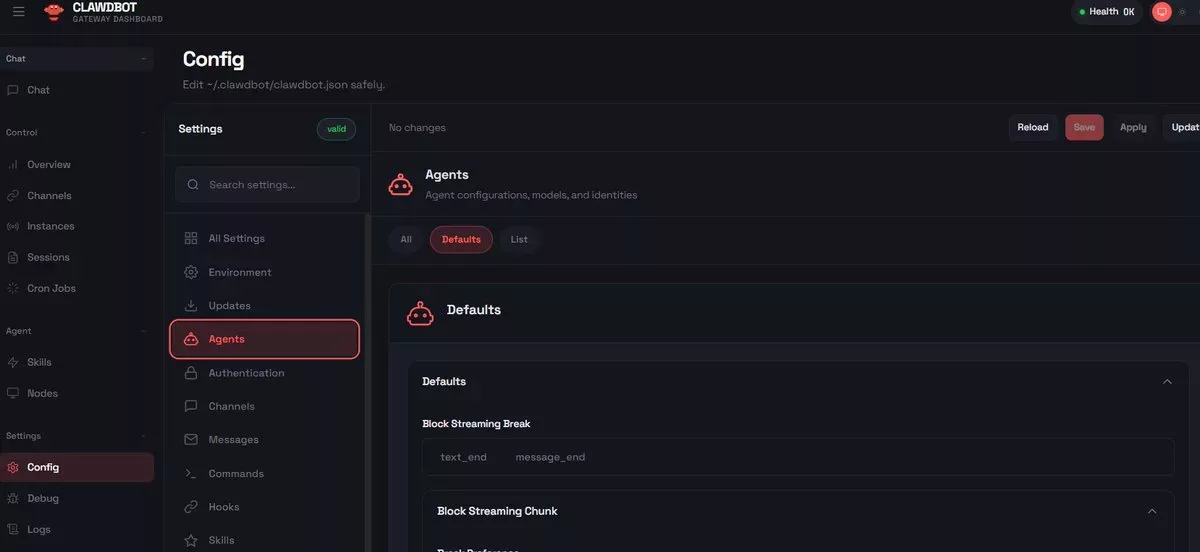
Production in minutes
UBOS automates the annoying parts of self-hosting: server setup, SSL, secrets, logs, and upgrades. You focus on using Clawd.bot.
Choose a dedicated VPS size and region. Start small, scale anytime.
Paste your LLM provider keys and optional messenger connectors. UBOS stores them securely.
UBOS deploys Clawd.bot, configures SSL, and gives you a dashboard + endpoint to start using it.
Tip: This is the fastest way to self host Clawd.bot on a dedicated VPS.
Understanding Clawd.bot
Clawd.bot is a self-hosted AI assistant designed to run on your own infrastructure, giving you full control over your data, integrations, and execution environment. Unlike cloud-based chatbots, Clawd.bot operates as a personal or team agent that can interact with messaging platforms, APIs, files, and internal tools.
The project became popular because it combines persistent memory, tool execution, and real-world actions into a single assistant that you can fully self-host. This makes Clawd.bot suitable for developers, founders, and teams who want automation without giving up privacy or ownership.
Clawd.bot is often used as a personal operations assistant — for managing tasks, connecting to external services, responding through messengers, or coordinating workflows — while remaining completely under the user’s control.
Practical examples
People search “what can Clawd.bot do?” — here are real-world ways teams use a self-hosted Clawd.bot server to automate work while keeping control of data and integrations.
Capture notes, decisions, and tasks across conversations — then retrieve them later to keep continuity.
Run Clawd.bot inside your messenger to answer, route, and automate without exposing internal tools.
Trigger scripts, call APIs, and connect services to turn requests into actions (with logs and safety).
A dedicated Clawd.bot server stays online for your team, handling requests and routines continuously.
Integrate with private dashboards, databases, or internal endpoints without exposing them to the public web.
Draft replies, summarize threads, keep follow-ups, and drive execution — all from one assistant endpoint.
Deploy on UBOS with SSL, secrets, logs, and upgrades — without building infrastructure yourself.
Self-hosting benefits
Self-hosting gives you control, privacy, and flexibility — especially when your assistant connects to messengers, APIs, and sensitive workflows.
Your logs, memory, and integrations stay on your infrastructure. This is important when Clawd.bot touches internal docs, customer data, or operational workflows.
A dedicated server means consistent CPU/RAM resources and fewer surprises. You can size the machine for your usage and scale when needed.
Self-hosting makes it easier to connect Clawd.bot to internal tools, private APIs, databases, and custom scripts — without exposing them publicly.
You own the environment and can export, migrate, or replicate the deployment. This avoids vendor lock-in and keeps your stack future-proof.
Most failures come from missing ops basics — not from Clawd.bot itself.
UBOS automates these essentials so your Clawd.bot deployment stays stable as you scale.
Hosting Clawd.bot in production
Running Clawd.bot locally works for experiments. Running it reliably, 24/7, with messengers and automations — requires production infrastructure.
If your Clawd.bot connects to messengers, runs continuously, stores memory, or automates real workflows, hosting it on UBOS avoids the reliability and maintenance issues of local hardware — while still keeping everything self-hosted.
Keep control • Avoid hardware headaches • Go live faster
FAQ
Yes. Your Clawd.bot instance runs on a dedicated server you control. UBOS automates deployment and operations (like SSL, secrets, logs, and upgrades), but the runtime and data stay on your server.
With UBOS, you select a server size, add your LLM API keys, and deploy the Clawd.bot template. UBOS configures the deployment and provides a dashboard and endpoint.
Not necessarily. You can self-host manually, but you’ll need to manage networking, SSL, secrets, updates, and monitoring. UBOS handles these pieces so you can deploy Clawd.bot without heavy DevOps work.
For most users, a small dedicated VPS is enough to start. If you add more integrations, heavier workflows, or run additional services (DB/queue), you can scale the server size as usage grows.
A Mac mini is great for local testing, but it becomes fragile for 24/7 usage (sleep, reboots, networking, SSL, and public endpoints). A dedicated server is usually better for reliable Clawd.bot hosting.
UBOS supports domain connection and SSL so your Clawd.bot endpoints can run securely. This helps when integrating with messengers and external services that require HTTPS.
Updates are a common source of downtime with self-hosted projects. UBOS focuses on safe upgrades and operational visibility, so you can update with more confidence and recover quickly if needed.
Some users refer to the project as Clawd.bot, while others use the Moltbot name. This landing page focuses on Clawd.bot searches and hosting intent. (You can also create a separate Moltbot landing for that keyword.)
Launch your Clawd.bot server with SSL, logs, and upgrades in minutes.
