

- Updated: February 3, 2026
- 6 min read
GitHub Plugin Introduces AI Contribution Blame for Pull Requests – Real‑Time Generative AI Attribution
The GitHub AI contribution blame plugin automatically flags AI‑generated code in pull requests, giving development teams instant visibility into which lines were authored by generative AI models.
GitHub AI Contribution Blame Plugin Turns AI‑Generated Code Into Transparent Pull‑Request Insight
As generative AI tools like Claude, Copilot, and Cursor become everyday assistants for developers, the line between human‑written and AI‑written code is blurring. While AI can accelerate delivery, it also raises questions about code provenance, licensing, and maintainability. The newly released GitHub AI contribution blame plugin answers that dilemma by automatically annotating pull‑request diffs with clear AI‑authorship markers. This news‑style article explains what the plugin does, why it matters to modern software teams, and how you can start using it today.
What Is the GitHub AI Contribution Blame Plugin?
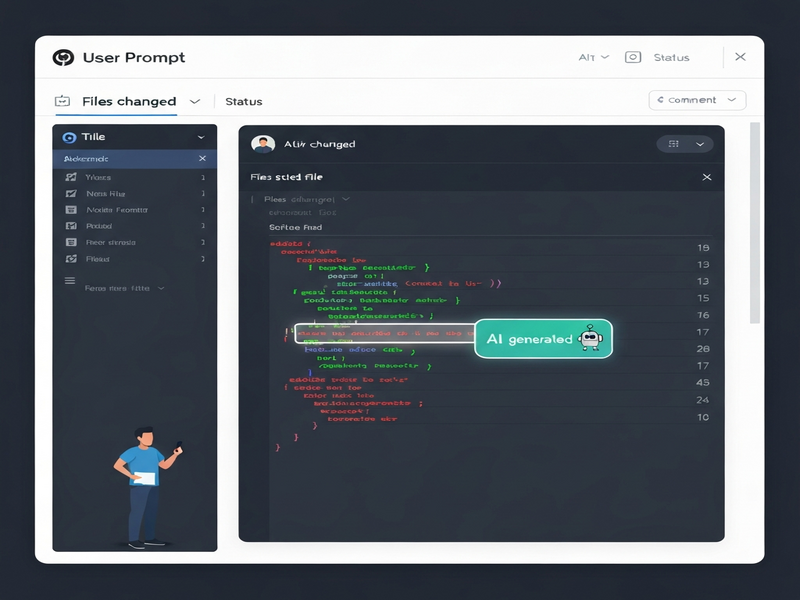
The plugin is a lightweight browser extension that injects AI‑authorship metadata directly into the GitHub pull‑request UI. It works by reading git notes that store per‑line AI contribution data—information that tools like OpenAI ChatGPT integration can push during the commit process. When a PR is opened, the extension highlights AI‑generated lines in a distinct color, adds a tooltip with the model name and prompt, and provides a summary percentage of AI‑versus‑human code.
In short, the plugin turns an otherwise invisible piece of metadata into a visual, actionable signal for reviewers, security auditors, and product managers.
Key Features
- Line‑by‑line attribution: Each line that originated from an AI model is highlighted with a gutter marker.
- Model & prompt visibility: Hovering over a highlighted line reveals the exact model (e.g., GPT‑4, Claude‑2) and the prompt that generated the snippet.
- AI‑code percentage meter: A concise badge at the top of the PR shows the overall AI contribution ratio.
- Git‑native storage: Uses
git notesso the metadata travels with the commit, surviving rebases, squashes, and cherry‑picks. - Customizable UI: Users can toggle the plugin on or off via a settings panel, and choose light or dark theme colors.
- Enterprise‑ready API: The plugin can push aggregated stats to dashboards, enabling compliance reporting.
Benefits for Development Teams
Adopting the plugin brings concrete advantages across the software lifecycle:
- Transparency & Trust: Reviewers instantly see which parts of a PR were AI‑generated, reducing surprise and fostering honest discussions about code quality.
- Compliance Assurance: Companies can enforce policies such as “no AI code in security‑critical modules” and generate audit trails for regulators.
- Quality Control: AI‑generated snippets often lack contextual comments; the plugin nudges developers to add documentation before merging.
- Skill Development: Teams can track reliance on AI tools, identify training gaps, and balance automation with human expertise.
- Cost Management: By measuring AI usage per PR, organizations can estimate token costs for services like OpenAI or Anthropic.
For SaaS companies that build AI‑enhanced products, these insights align perfectly with the Enterprise AI platform by UBOS, which already aggregates AI usage metrics across micro‑services.
How to Install and Use the Plugin
Getting the plugin up and running takes under five minutes. Follow these steps:
1. Prerequisites
- Git version 2.30+ (required for
git notessupport). - Node.js 14+ if you plan to generate notes locally.
- A supported browser (Chrome, Edge, or Firefox).
2. Install the Browser Extension
- Visit the Chrome Web Store and search for “GitHub AI Contribution Blame”.
- Click Add to Chrome and confirm the permissions.
- After installation, pin the extension for quick access.
3. Configure Git Notes
Run the following command in your repository to enable notes storage:
git config --global core.notesRef refs/notes/ai-contributionsWhen you generate code with an AI tool, use the helper script provided by the plugin’s Workflow automation studio to attach the model name and prompt to the commit:
git ai‑note --model "gpt‑4" --prompt "Create a REST endpoint for user login"4. Open a Pull Request
Push your changes and open a PR on GitHub as usual. The plugin will automatically read the notes, highlight AI‑generated lines, and display the AI‑code meter at the top of the diff view.
5. Review & Merge
During review, click any highlighted line to see the originating prompt. If the AI contribution exceeds your team’s policy threshold, you can request revisions directly from the PR interface.
For a visual walkthrough, see the UBOS templates for quick start page, which includes a step‑by‑step video demo of the plugin in action.
Real‑World Use Cases
Early adopters have reported measurable impact across diverse environments. Below are three representative scenarios:
A. Open‑Source Library Maintenance
Maintainers of a popular JavaScript utility library noticed a surge in PRs containing AI‑generated snippets. By enabling the plugin, they could automatically reject contributions that exceeded a 30% AI threshold, preserving code style consistency and reducing manual cleanup.
B. Financial Services Compliance
A fintech firm integrated the plugin with its internal CI pipeline. The AI‑code meter fed into a compliance dashboard built with the AI tools suite, flagging any PR that introduced AI‑generated logic into risk‑assessment modules. This prevented inadvertent licensing violations and satisfied audit requirements.
C. Startup MVP Acceleration
A SaaS startup leveraged the plugin to monitor AI usage while rapidly prototyping a new feature. The visibility helped the team allocate budget for OpenAI tokens and ensured that critical security code remained hand‑crafted. The approach aligns with the philosophy behind UBOS for startups, where speed and governance coexist.
Conclusion
The GitHub AI contribution blame plugin fills a critical gap in modern development workflows: it makes AI‑generated code visible, accountable, and manageable. By embedding attribution directly into pull‑request diffs, it empowers teams to enforce policies, maintain code quality, and keep costs under control—all without disrupting existing Git practices.
As generative AI continues to evolve, tools that surface provenance will become as essential as linters and CI pipelines. Early adoption not only safeguards your codebase today but also positions your organization to scale responsibly tomorrow.
Ready to Bring AI Transparency to Your Repos?
Explore how UBOS can extend the power of this plugin across your entire development stack:
- Learn more about the UBOS platform overview and its native support for Git‑based AI metadata.
- Try the AI SEO Analyzer to ensure your documentation stays searchable.
- Accelerate your next project with the AI Article Copywriter template.
- Join the UBOS partner program to get early access to upcoming AI‑code governance features.
- Need a custom workflow? Check out the Web app editor on UBOS for rapid prototyping.
Start today and turn every line of code into a transparent, auditable asset.
For the original announcement and technical details, see the GitHub release notes.