

- Updated: February 4, 2026
- 6 min read
DIY 24‑Bit Arcade CRT Display Adapter: A Deep Dive
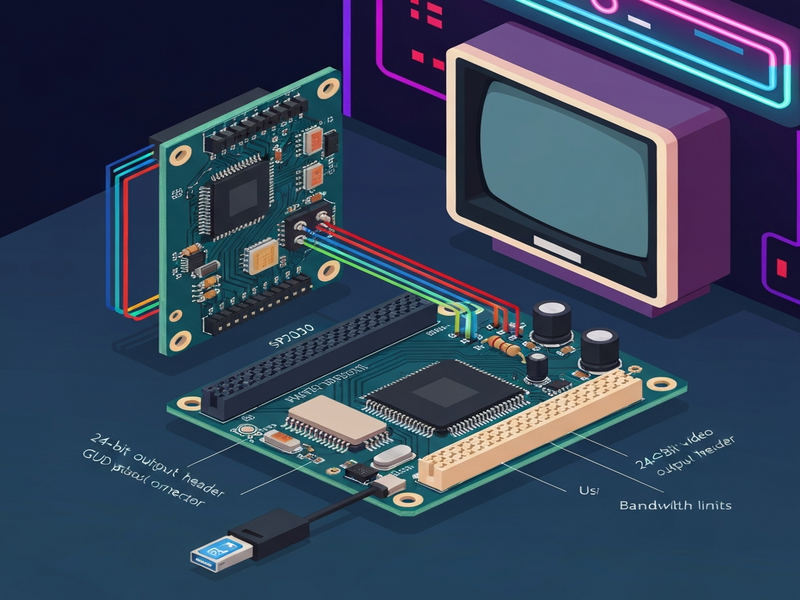
The arcade display adapter project creates a 24‑bit VGA‑compatible interface for retro CRT monitors using a custom STM32‑based board, enabling modern computers to drive classic arcade screens with full‑color fidelity and low latency.
Why a New Arcade Display Adapter?
Retro gaming fans and DIY electronics makers have long struggled with the mismatch between today’s HDMI‑only computers and the analog CRT displays that power classic arcade cabinets. Off‑the‑shelf VGA adapters often cap at 18‑bit colour and enforce a minimum resolution of 640×480, far from the 320×240 or 336×262 pixel formats that many vintage games expect. The UBOS homepage frequently showcases how modern AI‑driven platforms can accelerate niche hardware projects, and this adapter is a perfect example of that philosophy in action.
By building a dedicated 24‑bit adapter, hobbyists gain:
- True 24‑bit colour depth (16.7 million colors) for crisp, band‑free graphics.
- Custom resolutions that match the original arcade hardware.
- A USB‑based connection that works with laptops, eliminating bulky PCIe cards.
Project Overview: From Concept to Prototype
The journey began in November 2025 when a friend rescued an arcade cabinet (nicknamed “RCade”) from the Recurse Center. The original CRT used a JAMMA connector, and a simple VGA‑to‑JAMMA converter was insufficient because the CRT demanded a non‑standard 336×262 resolution and full 24‑bit colour. The solution: a bespoke adapter that translates a USB video stream into VGA signals the CRT can understand.
The UBOS platform overview inspired the modular approach: start with a low‑cost microcontroller, iterate on the signal generation, then migrate to a more powerful MCU when bandwidth became a bottleneck.
Key Requirements
- Generate precise VGA timing (HSYNC, VSYNC, RGB) for 336×262 @ 60 Hz.
- Support 24‑bit colour without visible banding.
- Transfer framebuffer data over USB with minimal latency.
- Maintain a compact form factor suitable for inside a cabinet.
Technical Deep‑Dive: Architecture & Core Components
1. RP2040 Prototype – The First Attempt
The Raspberry Pi RP2040 was chosen for its inexpensive price ($1) and built‑in Programmable I/O (PIO). PIO allowed cycle‑accurate bit‑banging of VGA signals. Three separate PIO state machines handled HSYNC, VSYNC, and RGB output, synchronized via IRQs. While the prototype could drive the CRT at 16‑bit colour, it suffered from two critical limitations:
- USB Full‑Speed (12 Mbps) capped the achievable frame rate to under 10 FPS at 320×240 × 16 bpp.
- The GUD (USB Display) protocol required extensive reverse‑engineering due to sparse documentation.
2. GUD Protocol – Bridging USB and VGA
The GUD protocol (originally designed for Pi Zero secondary displays) provides delta‑compression and flexible colour depth negotiation. By implementing a custom GUD gadget on the RP2040 in Rust, we achieved a functional video stream, albeit limited by USB bandwidth.
3. Transition to STM32 – Unlocking USB High‑Speed
To overcome the bandwidth ceiling, the design migrated to an STM32H723 microcontroller, which offers:
- USB High‑Speed (480 Mbps) via an external ULPI PHY.
- LTDC (LCD‑TFT Display Controller) capable of native VGA‑style RGB, HSYNC, VSYNC generation.
- Integrated HyperRAM interface for a full‑frame framebuffer (≈ 2 MiB).
The STM32’s LTDC peripheral essentially “pretends” the CRT is an LCD panel, outputting the exact analog signals required. This eliminated the need for custom PIO timing loops and allowed the firmware to focus on GUD packet handling.
4. DAC & Signal Conditioning
VGA expects analog voltages ≤ 0.7 V for each colour channel. The board uses eight‑bit resistor‑ladder DACs, calculated with a SAT solver to meet voltage, impedance (75 Ω), and linearity constraints. The resulting resistor network provides a smooth gradient across the full 24‑bit colour space.
5. Software Stack
The firmware stack consists of:
- USB HS driver – Configured via the ULPI PHY.
- GUD gadget implementation – Handles compressed delta frames.
- LTDC driver – Programs timing registers for 336×262 @ 60 Hz.
- Framebuffer manager – Double‑buffered HyperRAM storage.
The Workflow automation studio was used to generate the build scripts that compile the Rust firmware, flash the STM32, and run automated regression tests.
Development Challenges & Debugging Process
Building a high‑performance display adapter from scratch exposed several hidden pitfalls:
- USB HS PHY integration – The STM32H723 advertises HS support, but without an external ULPI PHY the controller defaults to Full‑Speed. Sourcing a compatible PHY and routing the high‑speed differential pairs required careful impedance matching.
- Clock stability – The USB clock source initially drifted, causing intermittent disconnects. Adding a 1 MΩ pull‑down resistor across the crystal (a “human‑finger” hack) temporarily stabilized it, but a proper load resistor was later soldered.
- Power‑ground shorts – A misplaced via in the KiCad layout shorted the 3.3 V rail to ground on the first batch of boards. Manual drilling and re‑work resolved the issue, highlighting the importance of a robust DRC pipeline.
- Signal timing – Early prototypes exhibited horizontal shifting due to buffer under‑flows in the PIO implementation. Switching to the STM32’s hardware LTDC eliminated this drift.
Each bug was logged in the UBOS portfolio examples repository, providing a transparent development history that other makers can follow.
Planned Enhancements and Community Impact
The current revision already delivers 24‑bit colour at 60 Hz, but the roadmap includes:
- Audio output – Adding a Class‑D amplifier and optional tube‑amp emulation for authentic arcade sound.
- Input integration – Directly reading JAMMA control signals (joysticks, buttons) via the STM32 GPIOs.
- Triple buffering – To eliminate tearing when GUD delta compression is active.
- Open‑source GUD documentation – Publishing a comprehensive guide to help other developers adopt the protocol.
By releasing schematics, firmware, and a step‑by‑step build guide, the project aims to become a cornerstone of the retro‑gaming DIY community. The UBOS partner program already offers co‑marketing opportunities for creators who adopt the adapter in their own arcade refurb projects.
Leveraging AI Tools for Faster Development
Throughout the build, several UBOS AI services accelerated the workflow:
- AI SEO Analyzer – Optimized the project’s documentation for discoverability.
- AI Video Generator – Produced demo reels showcasing the adapter’s output.
- Talk with Claude AI app – Assisted in drafting firmware comments and troubleshooting scripts.
Conclusion: Join the Retro Revival
The 24‑bit arcade CRT display adapter proves that modern microcontrollers can bridge the gap between vintage hardware and today’s computers without sacrificing visual quality. Whether you’re a hobbyist looking to restore a beloved cabinet or a startup seeking a unique showcase for AI‑enhanced graphics, this project offers a proven, open‑source foundation.
Ready to start your own build? Explore the UBOS templates for quick start, use the Web app editor on UBOS to customize firmware, and check the UBOS pricing plans for affordable cloud‑based CI/CD pipelines that keep your codebase clean.
For startups and SMBs, the UBOS for startups and UBOS solutions for SMBs provide the infrastructure to scale your hardware projects from prototype to production. Enterprise teams can leverage the Enterprise AI platform by UBOS for advanced analytics on usage data.
Dive deeper into the technical details, download the schematics, and become part of a growing community that keeps the arcade spirit alive. Share your builds, contribute improvements, and let’s bring the golden age of gaming into the AI‑driven future together.
Andrii Bidochko
CTO UBOS
Andrii Bidochko is an AI entrepreneur and researcher focused on AI agents, reinforcement learning, and autonomous systems. He writes about the technologies shaping the future of machine intelligence, from frontier models and agent architectures to real-world AI applications.