

- Updated: January 17, 2026
- 6 min read
Kodbox: Open‑Source Web File Manager Enhances Cloud Collaboration
Kodbox Launch: Open‑Source File Manager Redefines Self‑Hosted Cloud Storage
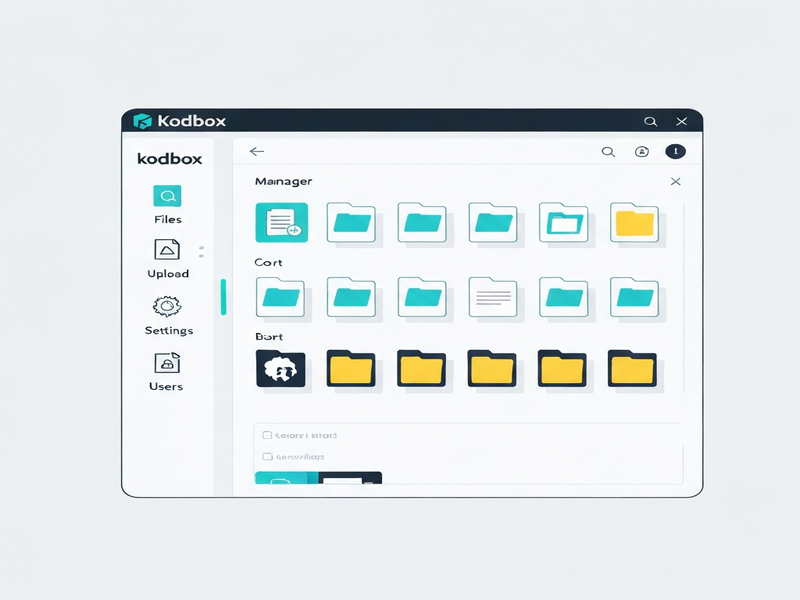
Kodbox is an open‑source, self‑hosted web file manager that lets you store, share, and edit files across multiple cloud services from a single browser interface. It combines a Windows‑like file‑explorer experience with powerful multi‑cloud integration, making it ideal for tech‑savvy professionals, small‑business owners, and developers who need full control over their data.
Why Kodbox Matters in 2024
In an era where data privacy and seamless collaboration are non‑negotiable, organizations are turning to self‑hosted solutions that avoid vendor lock‑in. Kodbox delivers a feature‑rich, browser‑based file manager that runs on any platform—Linux, Windows, or macOS—requiring only PHP 8.1+ and a MySQL or SQLite database. Its recent updates focus on multi‑cloud fusion, AI‑enhanced previews, and granular permission controls, positioning it as a serious competitor to commercial cloud drives.
Overview of Kodbox and Its Core Purpose
Kodbox originated as a modern rewrite of the popular Kodbox GitHub repository. The platform serves three primary goals:
- Self‑hosted cloud storage: Keep data on your own servers or private VPS.
- Unified multi‑cloud access: Connect local disks, FTP, WebDAV, Alibaba Cloud OSS, Tencent COS, Qiniu, MinIO, and any S3‑compatible storage.
- Collaborative editing: Edit code, markdown, Office documents, and media directly in the browser.
These capabilities make Kodbox a one‑stop shop for teams that need a secure, extensible file hub without sacrificing the convenience of modern cloud services.
Key Features & Recent Updates (2023‑2024)
1. Multi‑Cloud Fusion Engine
Kodbox now supports seamless mounting of any S3‑compatible storage alongside local disks. Users can drag‑and‑drop files between clouds, enabling instant migration and backup without leaving the UI.
2. AI‑Powered File Preview
Leveraging OpenAI ChatGPT integration, Kodbox can generate on‑the‑fly summaries of PDFs, extract key data from spreadsheets, and even transcribe audio files using the ElevenLabs AI voice integration. This reduces the need for external tools and speeds up decision‑making.
3. Fine‑Grained Permission Model
Permissions can be set at the level of departments, individual users, or even specific file versions. Role‑based access control (RBAC) integrates with LDAP/AD via the Telegram integration on UBOS for two‑factor authentication, ensuring that only authorized personnel can view or edit sensitive documents.
4. Real‑Time Collaboration
Multiple users can edit markdown, code, or Office files simultaneously. Changes are auto‑saved, and a full version history is retained, allowing you to revert to any prior state.
5. Extensible Plugin Ecosystem
Developers can add custom plugins for workflow automation, AI analytics, or integration with third‑party services. The Workflow automation studio on UBOS provides a visual canvas to orchestrate file‑based triggers, such as “when a new PDF is uploaded, run OCR and store the text in a database.”
6. Mobile & Desktop Clients
Native apps for iOS, Android, Windows, and macOS let users mount Kodbox as a network drive, offering a “no‑feel” experience identical to local file systems.
Installation & Platform Support
Getting Kodbox up and running is straightforward:
- Clone the repository:
git clone https://github.com/kalcaddle/kodbox.git - Set proper permissions:
chmod -R 777 ./kodbox/* - Configure your web server (NGINX example below) and ensure PHP 8.1+ with MySQL 5.7+ or SQLite is installed.
location / {
    if (!-e $request_filename) {
        rewrite ^[^index\.php](.*)$ /index.php?$1 last;
    }
}
The platform runs on any OS that supports PHP—Linux, Windows, macOS, and even low‑power devices like Raspberry Pi or NAS boxes. For Docker enthusiasts, an official Dockerfile is available in the repo, enabling one‑click deployment.
Licensing and Community Support
Kodbox is released under the GPLv3 license, granting you freedom to modify, redistribute, and even commercialize your customized version, provided you share source changes. The community is active on GitHub, with over 3 k stars and a vibrant plugin marketplace.
For enterprise‑grade support, consider joining the UBOS partner program, which offers SLA‑backed assistance, custom integration services, and priority bug fixes.
How Kodbox Stacks Up Against Competitors
| Feature | Kodbox | Nextcloud | OwnCloud |
|---|---|---|---|
| Multi‑cloud Fusion | ✓ (S3, OSS, COS, FTP, WebDAV) | Limited (external apps) | Limited (plugins) |
| AI Preview & Summarization | ✓ (ChatGPT, ElevenLabs) | ✗ | ✗ |
| Native Mobile Apps | ✓ (iOS, Android, Windows, macOS) | ✓ (via WebDAV) | ✓ (via WebDAV) |
| Fine‑grained Permissions | ✓ (role, department, file‑level) | ✓ (share links) | ✓ (share links) |
| Open‑source License | GPLv3 | AGPLv3 | AGPLv3 |
While Nextcloud and OwnCloud excel in community apps, Kodbox’s built‑in AI preview and true multi‑cloud fusion give it a decisive edge for teams that need a single pane of glass for disparate storage back‑ends.
Get Started with Kodbox Today
Ready to take control of your files? Download the latest release from GitHub and follow the quick‑start guide. For a visual walkthrough, see the screenshot below:
After installation, explore the UBOS templates for quick start to accelerate your custom workflow—whether you need an AI SEO Analyzer or an AI Article Copywriter to generate documentation for your new file system.
Explore Related UBOS Solutions
If you’re looking to complement Kodbox with AI‑driven capabilities, UBOS offers a suite of tools that integrate seamlessly:
- UBOS homepage – your gateway to the full AI platform.
- About UBOS – learn about the team behind the technology.
- UBOS platform overview – a deep dive into the modular architecture.
- UBOS for startups – why early‑stage companies love our low‑code environment.
- UBOS solutions for SMBs – scalable AI tools for growing businesses.
- Enterprise AI platform by UBOS – enterprise‑grade security and compliance.
- AI marketing agents – automate campaigns directly from your file repository.
- Web app editor on UBOS – build custom front‑ends for your file manager.
- UBOS pricing plans – transparent, usage‑based pricing.
- UBOS portfolio examples – see real‑world deployments.
Conclusion
Kodbox stands out as a powerful, open‑source alternative to commercial cloud drives, delivering multi‑cloud fusion, AI‑enhanced previews, and enterprise‑grade permission controls—all within a familiar Windows‑style UI. Its GPLv3 license ensures freedom to adapt, while the active community and robust plugin ecosystem guarantee longevity.
Whether you’re a developer building a custom SaaS product, a small business seeking secure file sharing, or an enterprise needing granular compliance, Kodbox provides the foundation. Pair it with UBOS’s AI suite for analytics, automation, and intelligent content generation, and you have a future‑proof, self‑hosted ecosystem that puts data sovereignty back in your hands.
Start your self‑hosted journey today—download, install, and let Kodbox transform the way you manage files.