

- Updated: March 15, 2026
- 5 min read
OpenAI OAuth Library Simplifies Integration for Developers
The OpenAI OAuth project provides a seamless OAuth‑based authentication layer that lets developers access the OpenAI API without managing traditional API keys.
1. Introduction to the OpenAI OAuth Project
OpenAI’s powerful language models are now reachable through a standard OAuth integration, turning the cumbersome API‑key workflow into a familiar, secure sign‑in experience. The community‑maintained OpenAI OAuth GitHub repository ships a CLI proxy and a Vercel AI SDK provider that automatically refreshes tokens, abstracts the authentication flow, and respects the rate limits tied to a user’s ChatGPT account.
For developers and tech enthusiasts looking for a plug‑and‑play solution, this project eliminates the need to purchase separate API credits while still delivering full access to the models you already own in your ChatGPT subscription.
Learn more about the broader ecosystem at the UBOS homepage, where AI‑driven tools are built on top of similar authentication patterns.
2. Core Features and Usage Scenarios
- Localhost proxy (CLI): Run
npx openai-oauthto spin up a local endpoint (e.g.,http://127.0.0.1:10531/v1) that forwards requests with refreshed OAuth tokens. - Vercel AI SDK provider: Import
createOpenAIOAuth()in serverless functions to get a ready‑to‑useopenai()client. - Model allow‑list: Dynamically expose only the models your ChatGPT plan supports, or manually specify a comma‑separated list.
- Streaming & tool‑calls support: Full compatibility with
/v1/chat/completions, streaming responses, and tool‑call payloads. - Zero API‑key cost: Leverages the rate limits attached to your personal ChatGPT account, ideal for prototyping and low‑volume production.
Typical Use Cases
- Rapid prototyping of AI‑enhanced SaaS features without budgeting for API credits.
- Local development environments that mirror production OAuth flows for compliance testing.
- Educational workshops where participants can experiment with GPT models using their own accounts.
- Integration into internal tools that already rely on OpenAI ChatGPT integration on the UBOS platform.
3. Benefits and Limitations
Benefits
- Eliminates the need for separate billing accounts.
- Uses familiar OAuth token refresh mechanisms, reducing security risk.
- Works out‑of‑the‑box with existing UBOS Workflow automation studio templates.
- Open‑source, community‑driven, and easily extensible.
Limitations
- Only models available to your ChatGPT subscription are accessible.
- Login flow is not bundled; you must run
npx @openai/codex loginfirst. - Stateless proxy – you must send the full conversation history on each request.
- Not intended for multi‑tenant SaaS hosting; use only on trusted local machines.
4. Getting Started Guide
Step 1 – Install the CLI
npx openai-oauthStep 2 – Authenticate
Run the helper command npx @openai/codex login to generate the local auth.json file. The CLI will automatically read this file from ~/.chatgpt-local/auth.json (or a custom path you provide via --oauth-file).
Step 3 – Choose a Port and Host
npx openai-oauth --host 127.0.0.1 --port 10531Step 4 – Point Your Application to the Proxy
Update your SDK configuration to use http://127.0.0.1:10531/v1 as the base URL. For example, in a Node.js project:
import { OpenAI } from "openai";
const client = new OpenAI({ baseURL: "http://127.0.0.1:10531/v1" });
const response = await client.chat.completions.create({
  model: "gpt-5.4",
  messages: [{ role: "user", content: "Explain OAuth in 2 sentences." }],
});
Step 5 – Verify the Flow
A quick curl test confirms the proxy is forwarding correctly:
curl -X POST http://127.0.0.1:10531/v1/modelsNeed a visual editor? The Web app editor on UBOS lets you drag‑and‑drop the same endpoint into a low‑code UI, perfect for rapid internal tooling.
5. OAuth Flow Illustration
Below is a simplified diagram that captures the essential steps from user login to token‑refresh and API request forwarding.
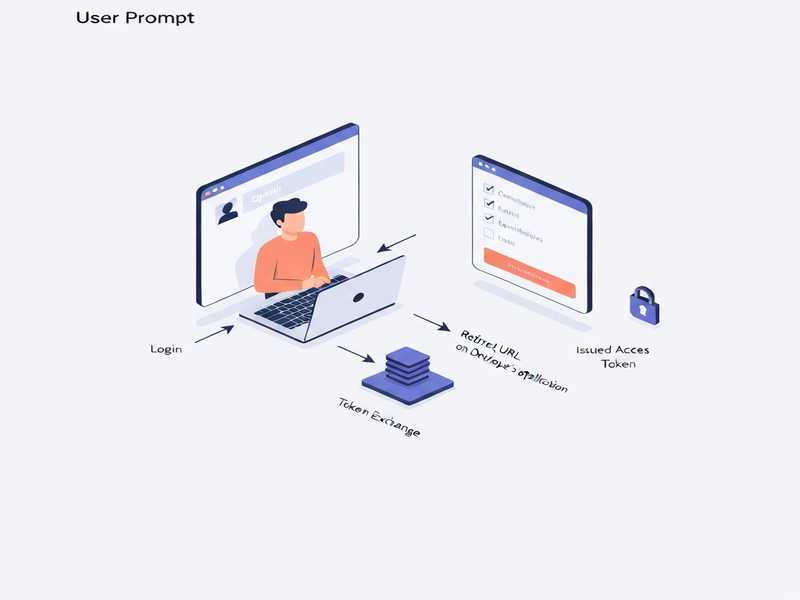
The illustration highlights three core components: the user’s browser, the local OAuth proxy, and the OpenAI backend. Tokens are stored securely on the developer’s machine and refreshed automatically whenever they expire.
6. External Resources
For the most up‑to‑date code, contribution guidelines, and issue tracking, visit the official repository:
OpenAI OAuth GitHub repository.
The project’s README also contains a detailed FAQ that covers token storage locations, supported models, and troubleshooting tips.
7. Related UBOS Resources for Developers
Explore these UBOS solutions that complement the OpenAI OAuth workflow:
- UBOS platform overview – a unified environment for building AI‑first applications.
- AI marketing agents – leverage OAuth‑authenticated OpenAI models for automated copy generation.
- UBOS pricing plans – find a tier that matches your development budget.
- Workflow automation studio – design end‑to‑end pipelines that call the local OAuth proxy.
- Chroma DB integration – pair vector search with authenticated GPT calls.
- ElevenLabs AI voice integration – turn text responses into natural speech.
- AI SEO Analyzer – a ready‑made template that uses the same OAuth flow for content audits.
- AI Article Copywriter – generate long‑form articles without exposing API keys.
- AI Video Generator – combine GPT‑generated scripts with video synthesis.
- Enterprise AI platform by UBOS – scale OAuth‑based access across large teams.
Stay updated with the latest announcements on the UBOS news page.
Conclusion
The OpenAI OAuth project democratizes access to powerful language models by turning personal ChatGPT credentials into a secure, reusable authentication layer. While it shines for prototyping, internal tooling, and low‑volume production, developers must respect its limitations—especially the single‑tenant nature and model‑availability constraints.
By pairing this OAuth solution with UBOS’s low‑code ecosystem—such as the Web app editor or the Workflow automation studio—you can accelerate AI‑driven product development while keeping security and cost under control.
Andrii Bidochko
CTO UBOS
Andrii Bidochko is an AI entrepreneur and researcher focused on AI agents, reinforcement learning, and autonomous systems. He writes about the technologies shaping the future of machine intelligence, from frontier models and agent architectures to real-world AI applications.