

- Updated: January 17, 2026
- 8 min read
Keychron Nape Pro Turns Mechanical Keyboard into Laptop‑Style Trackball Rig – CES 2026 Hands‑On Review
Keychron’s Nape Pro trackball attachment transforms a traditional mechanical keyboard into a compact, ergonomic pointing device that fits perfectly on a ten‑key‑less board, and it debuted as one of the headline accessories at CES 2026. The modular unit combines a 25 mm thumb‑trackball, six silent Huano switches, and adaptive OctaShift software built on open‑source ZMK firmware, giving hobbyists and professionals a fully programmable, space‑saving control surface.
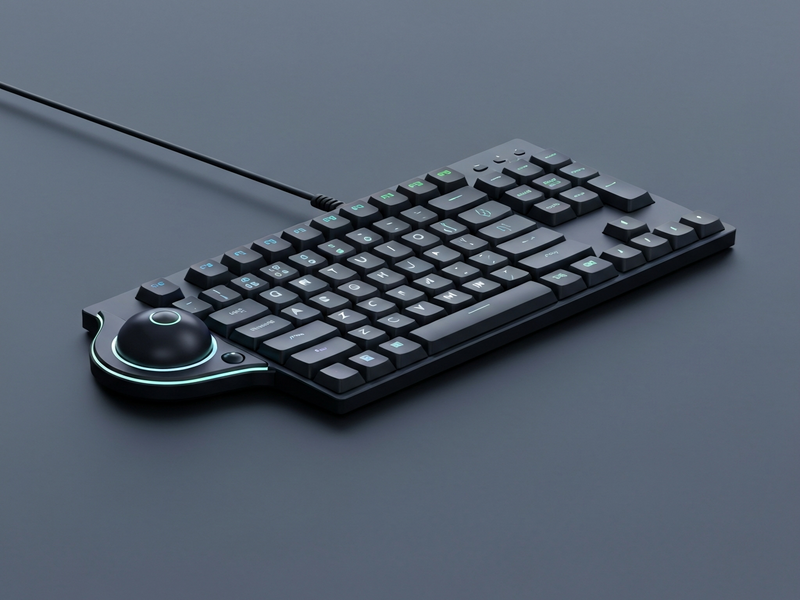
Keychron Nape Pro at CES 2026: A New Direction for Mechanical Keyboards
CES 2026 showcased a wave of modular peripherals, but the Keychron Nape Pro stole the spotlight by rethinking where a pointing device belongs. Instead of the traditional mouse that lives on the far right of a desk, the Nape Pro sits between your hands, turning the keyboard into a true all‑in‑one workstation. The device was unveiled at Keychron’s booth alongside the Q1 Pro, instantly drawing crowds of mechanical‑keyboard enthusiasts, custom‑keyboard hobbyists, and tech reviewers.
For anyone who spends hours typing, the distance between the keyboard and mouse is a hidden source of strain. By bringing the trackball to the thumb, the Nape Pro eliminates that lateral reach, promising a healthier posture and faster workflow.
Design and Modular Features of the Trackball Attachment
Physical Dimensions and Build Quality
The Nape Pro measures just 135.2 mm × 34.7 mm, a footprint that slides neatly under a ten‑key‑less (TKL) board without adding bulk. Its slim aluminum chassis matches Keychron’s signature aesthetic, while the surface is coated with a matte finish to resist fingerprints.
- 25 mm thumb‑trackball made from high‑precision ceramic material.
- Six Huano micro‑switches rated for 50 M clicks, delivering a whisper‑quiet experience.
- Integrated scroll wheel that doubles as a macro trigger when combined with OctaShift layers.
- USB‑C power and data port for wired use, plus Bluetooth 5.2 and a 2.4 GHz dongle for wireless flexibility.
Button Layout and Thumb Ergonomics
The button arrangement is purpose‑built for thumb operation. Two outer buttons (M1, M2) are positioned for easy reach regardless of orientation, while the inner four provide programmable macro slots. The trackball sits directly under the thumb, allowing users to scroll, pan, and click without lifting a finger from the home row.
Keychron’s engineers tested the attachment with a range of hand sizes, ensuring the ball’s travel distance feels natural for both left‑ and right‑handed users. The result is a device that feels like an extension of the keyboard rather than an afterthought.
Adaptive OctaShift Software and Open‑Source ZMK Firmware
OctaShift: Orientation‑Aware Mapping
OctaShift is the brain behind the Nape Pro’s chameleon‑like behavior. It detects the attachment’s orientation—horizontal, vertical, or angled—and automatically remaps the six buttons to suit the current layout. This means the same physical button can act as a left‑click in one orientation and a macro trigger in another, without any manual reconfiguration.
OctaShift also supports up to eight layers, each with its own set of keycodes, media controls, and custom scripts. Users can switch layers on‑the‑fly with a dedicated layer‑toggle button, turning the Nape Pro into a mini‑macro pad for video editing, gaming, or coding.
ZMK Firmware: Community‑Driven Customization
Under the hood, the Nape Pro runs on ZMK firmware, the open‑source platform beloved by the custom‑keyboard community. This choice unlocks several advantages:
- Full keycode support: From standard QWERTY keys to advanced HID reports.
- Hot‑swappable layouts: Users can flash new keymaps via USB‑C without opening the case.
- Community contributions: Keychron will release the 3D‑printable case files, encouraging users to design custom stands, button caps, or even entirely new shells.
Because ZMK is actively maintained, security patches and feature updates arrive regularly, ensuring the Nape Pro stays future‑proof.
User Experience, Ergonomics, and Target Audience
The Nape Pro is engineered for three core user groups:
- Mechanical‑keyboard enthusiasts: Those who already invest in premium switches and custom keycaps will appreciate the seamless integration and open‑source firmware.
- Productivity power users: Writers, programmers, and video editors who need rapid cursor control without breaking their typing flow.
- Ergonomic seekers: Anyone looking to reduce shoulder and wrist strain by eliminating the traditional mouse‑to‑keyboard distance.
Key benefits include:
- Reduced hand travel → lower fatigue.
- Instant macro access → faster repetitive tasks.
- Quiet operation → ideal for shared workspaces.
- Modular design → can be detached and used as a standalone trackball.
Comparison with Other Trackball Solutions
While many trackballs exist on the market, the Nape Pro’s integration and software set it apart. Below is a quick side‑by‑side comparison:
| Feature | Keychron Nape Pro | Kensington Expert | Logitech MX Ergo |
|---|---|---|---|
| Form factor | Modular keyboard attachment | Standalone desk unit | Standalone trackball |
| Ball size | 25 mm (thumb‑centric) | 32 mm | 32 mm |
| Switches | 6 × Huano micro‑switches (quiet) | Mechanical button | Mechanical button |
| Software | OctaShift + ZMK (open‑source) | Kensington SetPoint | Logitech Options |
| Connectivity | Bluetooth, 2.4 GHz dongle, USB‑C | USB | USB, Bluetooth |
| Customization | Full firmware flashing, 8 layers | Limited button mapping | Limited macro support |
Real‑World Use Cases and Workflow Integration
Below are typical scenarios where the Nape Pro shines:
- Code navigation: Scroll through files, switch tabs, and trigger build scripts without leaving the home row.
- Video editing: Assign the scroll wheel to timeline scrubbing and the outer buttons to cut/undo actions.
- Live streaming: Map macro buttons to switch scenes, mute mics, or launch chat overlays.
- Gaming: Use the trackball for precise camera control while keeping WASD keys for movement.
How UBOS Enhances Your Custom Keyboard Ecosystem
For developers who want to push the Nape Pro beyond its out‑of‑the‑box capabilities, the UBOS platform overview offers a low‑code environment to build companion web apps, dashboards, or AI‑driven assistants that communicate directly with the trackball via ZMK’s BLE API.
Imagine a scenario where the trackball triggers an AI‑generated snippet of code based on your spoken command. Using the AI marketing agents module, you could automate social‑media posting while you fine‑tune your keyboard layout.
The Workflow automation studio lets you chain events: a thumb‑click on the Nape Pro could start a Zapier‑like workflow that logs time, updates a Trello board, and sends a Slack notification—all without leaving your desk.
If you prefer a visual builder, the Web app editor on UBOS provides drag‑and‑drop components to create custom UI panels that sit on your monitor, reflecting the current layer state of the Nape Pro in real time.
Pricing is transparent: check the UBOS pricing plans to find a tier that matches your hobbyist or enterprise needs.
Startups looking for rapid prototyping can leverage UBOS for startups, while SMBs benefit from UBOS solutions for SMBs. Large enterprises can explore the Enterprise AI platform by UBOS for scaling the same workflow across dozens of workstations.
Developers who want to showcase their creations can add them to the UBOS portfolio examples and even sell templates via the UBOS templates for quick start.
Pricing, Availability, and Where to Buy
The Nape Pro is slated for release in Q2 2027, with pre‑orders opening on Keychron’s official store shortly after CES. Pricing starts at $129 USD for the base unit; a bundled kit that includes a magnetic stand and extra button caps is priced at $159. Early‑bird discounts are available for members of the UBOS partner program, which also grants access to exclusive firmware builds.
Conclusion: A Game‑Changer for the Mechanical‑Keyboard Community
The Keychron Nape Pro trackball attachment is more than a peripheral—it’s a statement that the future of typing and pointing is modular, programmable, and ergonomically unified. By marrying a thumb‑centric trackball with adaptive OctaShift software and open‑source ZMK firmware, Keychron delivers a device that feels native to any mechanical keyboard while offering the flexibility of a full‑featured macro pad.
Whether you’re a seasoned keyboard modder, a productivity‑focused professional, or a developer eager to integrate AI workflows, the Nape Pro opens new possibilities. Pair it with UBOS’s low‑code ecosystem to create custom dashboards, AI assistants, and automated pipelines that turn every thumb click into actionable intelligence.
Ready to experience the next evolution in keyboard ergonomics? Visit the UBOS homepage for more resources, join the community, and stay tuned for the official launch announcement.
Further Reading
For a deeper dive into the design philosophy behind the Nape Pro, see the original coverage on Yanko Design article. The piece includes high‑resolution photos and an interview with Keychron’s lead designer.