

- Updated: February 2, 2026
- 6 min read
Firefox 148 Introduces AI Controls to Block Generative Features – Boosting Browser Privacy
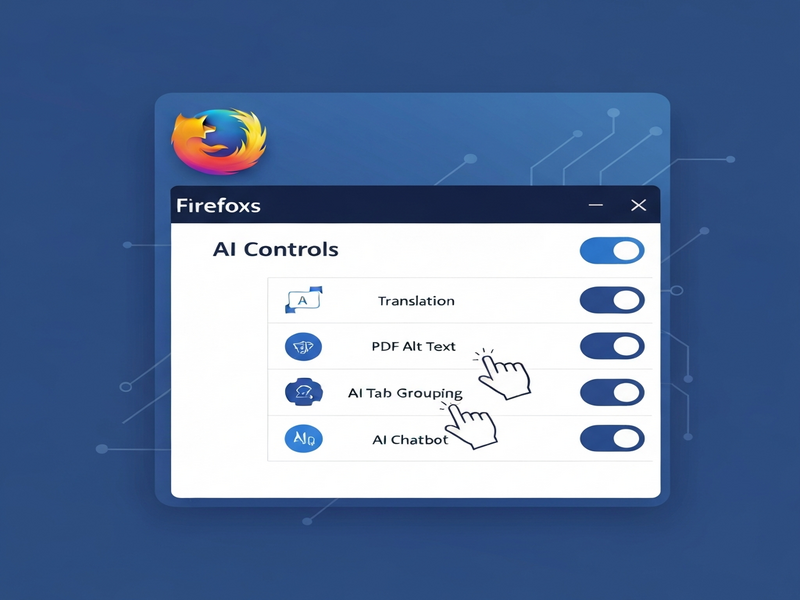
Firefox 148 adds a dedicated “AI controls” panel that lets users block every generative‑AI feature—now and in future releases—giving privacy‑focused browsers full control over AI‑driven enhancements.
What’s New in Firefox 148?
Starting on February 24, 2026, Mozilla’s flagship browser ships with an AI controls section embedded in the desktop settings. This new hub consolidates all AI‑related toggles—translations, PDF alt‑text generation, AI‑enhanced tab grouping, link previews, and the sidebar chatbot—under a single, easy‑to‑manage interface. Users who prefer a “no‑AI” experience can flip a single “Block AI enhancements” switch, while power users can fine‑tune each feature individually.
The move reflects Mozilla’s long‑standing commitment to user choice and transparency, echoing CEO Anthony Enzor‑DeMeo’s promise that “AI should always be a choice.” With privacy‑conscious internet users demanding more granular control, Firefox 148 positions itself as the first major browser to make AI optional by default.
A Deep Dive into the New AI Controls Section
Firefox’s AI controls are organized into two primary layers:
- Global Block Toggle: Instantly disables all current and future generative‑AI features, removing pop‑ups, suggestions, and background calls to AI services.
- Granular Feature Switches: Allows users to keep specific tools active while turning off others.
Key Features You Can Manage
| Feature | What It Does | Control Option |
|---|---|---|
| Translations | Real‑time page translation powered by generative AI. | Enable / Disable |
| PDF Alt‑Text | Automatic generation of descriptive alt‑text for PDF images. | Enable / Disable |
| AI‑Enhanced Tab Grouping | Smart grouping of related tabs using AI similarity analysis. | Enable / Disable |
| Link Previews | Hover‑over previews generated on‑the‑fly. | Enable / Disable |
| Sidebar Chatbot | Integrated chatbot that can connect to Anthropic Claude, OpenAI ChatGPT, Microsoft Copilot, Google Gemini, or Le Chat Mistral. | Enable / Disable |
Each toggle lives under the Settings → Privacy & Security → AI Controls path, making it discoverable without digging through hidden menus. The UI follows Mozilla’s clean design language, with clear labels, tooltips, and a “Learn more” link that points to a concise help article.
Future‑Proofing: Blocking Features Not Yet Released
Mozilla’s engineers built the global block toggle to be forward‑compatible. When new AI‑driven capabilities land—such as AI‑generated code suggestions or voice‑assistant integration—the same switch will automatically suppress them, sparing users from future “opt‑out” fatigue.
Why These Controls Matter for Privacy‑Conscious Users
Generative AI models rely on massive data pipelines, often sending snippets of user activity to remote servers for inference. While these calls improve convenience, they also raise legitimate concerns about data leakage, profiling, and inadvertent sharing of sensitive information.
Firefox 148’s controls address three core privacy pillars:
- Data Minimization: By disabling AI features, the browser stops transmitting content to external AI endpoints.
- Transparency: Each toggle includes a short description of what data would be sent if the feature were active.
- User Agency: Users decide, not the product roadmap, which AI tools they want to enable.
For enterprises and SMBs that must comply with GDPR, CCPA, or industry‑specific regulations, the ability to turn off AI at the browser level simplifies compliance audits. It also aligns with Mozilla’s broader “rebel alliance” strategy—partnering with startups and public‑interest technologists to build trustworthy AI ecosystems.
Mozilla’s Ongoing Commitment to Optional AI and Transparency
Since appointing Anthony Enzor‑DeMeo as CEO in December 2025, Mozilla has publicly pledged to make AI an opt‑in experience. In a recent blog post, Enzor‑DeMeo wrote, “AI should always be a choice—something people can easily turn off. People should know why a feature works the way it does and what value they get from it.”
This philosophy is evident not only in Firefox 148 but also in Mozilla’s broader ecosystem, including the About UBOS page, which highlights the company’s dedication to open‑source, privacy‑first AI platforms.
Mozilla is also investing $1.4 billion in a “rebel alliance” of startups, developers, and public‑interest groups to foster AI transparency. The funding aims to counterbalance the rapid growth of AI giants by supporting tools that prioritize user consent and data protection.
Read the Full Announcement
The original announcement was covered by TechCrunch, which provides additional context on Mozilla’s strategic direction and the competitive landscape of AI‑enabled browsers.
How UBOS Helps You Leverage AI Safely
While Firefox gives you the power to block AI at the browser level, many organizations still need AI capabilities for business processes. UBOS offers a suite of tools that let you harness AI responsibly:
- UBOS platform overview – A unified environment for building, deploying, and monitoring AI‑driven applications.
- Enterprise AI platform by UBOS – Scalable AI services with built‑in data‑privacy controls.
- AI marketing agents – Automate campaigns while keeping user data under strict governance.
- Workflow automation studio – Create no‑code automations that respect privacy policies.
- Web app editor on UBOS – Build custom interfaces that integrate only the AI services you approve.
- UBOS pricing plans – Transparent pricing with no hidden AI data‑usage fees.
For startups looking for a quick launch, the UBOS for startups page showcases pre‑configured AI stacks that can be turned on or off with a single click—mirroring the flexibility Firefox now offers its users.
SMBs can explore UBOS solutions for SMBs, which include ready‑made templates such as the AI SEO Analyzer and AI Article Copywriter. These tools let you benefit from AI without sacrificing control over data flow.
Developers interested in conversational AI can experiment with the GPT‑Powered Telegram Bot or explore the ChatGPT and Telegram integration for secure, channel‑specific interactions.
All UBOS offerings are built on a foundation of open standards, making it easy to audit, extend, or replace any AI component—exactly the kind of transparency that Firefox’s new controls champion.
Conclusion: Choice Is the New Default
Firefox 148’s AI controls mark a pivotal shift in how browsers treat generative AI: from an assumed feature to an optional service. By giving users a single toggle to block all AI, and granular switches for individual tools, Mozilla reaffirms its privacy‑first ethos while still offering cutting‑edge AI conveniences for those who want them.
For privacy‑savvy individuals, the new settings provide immediate peace of mind. For enterprises, they simplify compliance and data‑governance. And for developers seeking a responsible AI stack, UBOS delivers a complementary ecosystem where control, transparency, and scalability go hand‑in‑hand.
As AI continues to permeate every corner of the web, the ability to say “no”—or “yes, but only on my terms”—will become a decisive factor in user trust. Firefox 148 sets the benchmark; the rest of the industry will need to follow.
Andrii Bidochko
CTO UBOS
Andrii Bidochko is an AI entrepreneur and researcher focused on AI agents, reinforcement learning, and autonomous systems. He writes about the technologies shaping the future of machine intelligence, from frontier models and agent architectures to real-world AI applications.