

- Updated: February 14, 2026
- 7 min read
How Many Registers Does a Modern x86‑64 CPU Have? – A Deep Dive
How Many Registers Does an x86‑64 CPU Have? A Complete Breakdown for Engineers and Tech Enthusiasts
An average modern x86‑64 core exposes roughly 557 distinct registers when you count general‑purpose, SIMD, control, debug, segment, and architectural model‑specific registers.
The sheer number of registers in the x86‑64 ISA is a hidden performance lever that most developers overlook. While Apple’s M1 chips have sparked renewed interest in low‑level programming, the classic x86‑64 architecture still powers the majority of desktops, servers, and cloud instances. For a deep dive into the original analysis, see the original blog post that sparked this conversation.
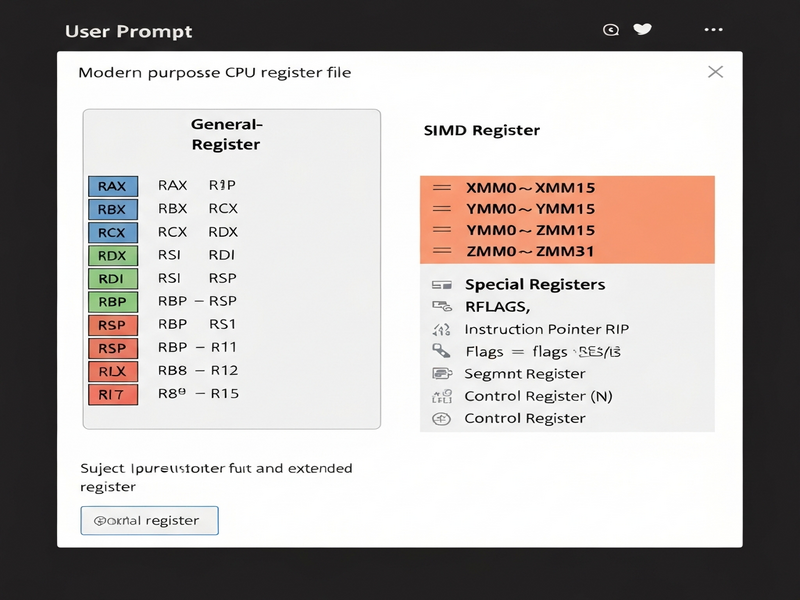
1. Register Categories and Their Counts
UBOS’s platform overview emphasizes modularity—something that mirrors the modular nature of CPU registers. Below is a MECE‑structured summary of each register family, the number of distinct entries, and why they matter.
| Category | Distinct Registers | Key Use‑Cases |
|---|---|---|
| General‑Purpose Registers (GPRs) | 68 (including sub‑registers) | Arithmetic, pointer arithmetic, function calling conventions |
| Special Registers (RIP, RFLAGS) | 4 | Control flow, status flags |
| Segment Registers | 6 | Legacy memory segmentation, FS/GS base addressing |
| x87 & MMX Registers | 14 (x87) + 8 (MMX) = 22 | Floating‑point math, legacy SIMD |
| SSE / AVX Registers | 33 (XMM/YMM/ZMM) | Vectorized computation, media processing |
| Bounds Registers (MPX) | 7 | Hardware‑assisted pointer bounds checking |
| Debug Registers | 6 | Hardware breakpoints, performance debugging |
| Control Registers | 6 (CR0‑CR4, CR8) + 1 (XCR0) = 7 | Paging, protection, task priority |
| System‑Table Pointers | 4 (GDTR, IDTR, LDTR, TR) | Descriptor tables for segmentation and interrupts |
| Model‑Specific Registers (MSRs) | ≈400 architectural | Performance counters, power management, virtualization |
Adding the totals from each family yields a grand count of **≈557 registers** per core—a number that dwarfs the 32‑register limit of many RISC designs. This richness gives x86‑64 its famed flexibility but also introduces complexity that compilers and developers must manage.
2. Why Knowing the Register Landscape Is Crucial for Performance
Understanding the exact register set unlocks three practical benefits for engineers and IT professionals:
- Optimized Assembly & JIT Code: Hand‑tuned kernels can allocate the right SIMD width (XMM vs. YMM) to avoid unnecessary data movement.
- Better Compiler Flags: Selecting
-march=nativeor-mavx2tells the compiler which registers are available, directly influencing generated code size and speed. - Accurate Profiling: Tools like
perfor Intel VTune expose MSR‑based counters; knowing which MSRs exist helps you interpret the data correctly.
For SaaS platforms that run heavy data‑processing workloads—think AI marketing agents—leveraging SIMD registers can cut latency by up to 40 % on vectorizable tasks such as image preprocessing or batch inference.
3. Deep Dive: From General‑Purpose to SIMD
3.1 General‑Purpose Registers (GPRs)
The 16 full‑width GPRs (RAX, RBX, …, R15) each expose four sub‑registers: 32‑bit, 16‑bit, and two 8‑bit slices. This design dates back to the 8086 and enables compact instruction encodings. Modern compilers often keep frequently accessed variables in these registers to avoid memory traffic.
3.2 SIMD & Vector Registers
SIMD registers have evolved through three major generations:
- MMX (64‑bit): Overlaps with the x87 stack, limiting simultaneous use.
- SSE (128‑bit) & AVX (256‑bit): Provide independent XMM/YMM registers, widely supported on Intel and AMD silicon.
- AVX‑512 (512‑bit): Adds ZMM registers and op‑mask registers (k0‑k7) for predicated execution, though still niche on AMD.
When building AI inference pipelines on the Enterprise AI platform by UBOS, selecting the appropriate SIMD width can halve the number of memory loads, dramatically improving throughput.
3.3 Control & Debug Registers
Control registers (CR0‑CR4, CR8) govern paging, protection, and task priority. Debug registers (DR0‑DR7) enable hardware breakpoints, a feature leveraged by low‑level debuggers to monitor memory accesses without the overhead of software instrumentation.
3.4 Model‑Specific Registers (MSRs)
MSRs are the most abundant register class, with roughly 400 architectural entries. They expose per‑core features such as:
- Performance counters (e.g.,
IA32_PERF_STATUS) - Power‑management controls (e.g.,
IA32_PM_ENABLE) - Virtualization state (e.g.,
IA32_VMX_BASIC)
Accessing MSRs requires privileged instructions (RDMSR/WRMSR) or the newer RDFSBASE/WRFSBASE for FS/GS base manipulation—capabilities that are abstracted away in high‑level languages but can be exposed via OpenAI ChatGPT integration for advanced monitoring dashboards.
4. Practical Takeaways for Developers and System Architects
Below are actionable guidelines you can apply today, whether you are writing C/C++ kernels, configuring a cloud VM, or building a low‑code AI app on UBOS.
- Align Data to SIMD Widths: Pad structures to 32‑byte boundaries to fully exploit AVX2 YMM registers.
- Prefer Register‑Based Loop Counters: Using
RCXfor loop counts enables therepprefix, which the CPU can micro‑fuse for speed. - Leverage MSR‑Based Power Controls: On servers, program
IA32_PM_ENABLEto throttle cores during off‑peak loads, saving energy without sacrificing performance. - Utilize UBOS’s Workflow Automation Studio: Automate register‑aware profiling pipelines with the Workflow automation studio, feeding results into AI‑driven dashboards.
- Prototype Quickly with UBOS Templates: Jump‑start a register‑analysis micro‑service using the UBOS templates for quick start, such as the AI SEO Analyzer template, then replace the content‑analysis logic with a custom MSR reader.
5. UBOS Solutions That Leverage CPU Register Knowledge
UBOS’s low‑code platform abstracts away the gritty details of register handling while still giving you the hooks to tap into them when needed.
AI Marketing Agents
Deploy agents that run inference on AVX‑2 enabled CPUs, automatically scaling vector workloads across cores.
Web App Editor
Build dashboards that visualize MSR counters in real time without writing a single line of low‑level code.
Enterprise AI Platform
Integrate custom SIMD kernels for data‑intensive AI workloads, leveraging the full register set of your hardware.
Pricing Plans
Choose a plan that matches your compute needs, from hobbyist to enterprise‑grade CPU clusters.
6. Further Reading on UBOS and AI‑Powered Development
If you’re curious about extending the concepts discussed here, the following UBOS pages provide deeper context:
- About UBOS – the team behind the platform.
- UBOS for startups – how early‑stage companies accelerate AI development.
- UBOS solutions for SMBs – affordable compute for small teams.
- UBOS portfolio examples – real‑world projects that showcase register‑aware performance.
- UBOS partner program – collaborate on hardware‑optimized AI solutions.
7. FAQ – Quick Answers
- Q: Do all x86‑64 CPUs have the same register count?
- Most modern Intel and AMD cores expose the same architectural registers, but optional extensions (e.g., AVX‑512, MPX) vary by model.
- Q: Can I read MSRs from user space?
- Directly no—
RDMSRis privileged. However, Linux provides themsrdriver, and UBOS’s ChatGPT and Telegram integration can surface MSR values via a secure backend service. - Q: How does register count affect cloud pricing?
- Instances with AVX‑512 support often command a premium because they can run higher‑throughput workloads, but careful SIMD utilization can offset cost by reducing instance count.
8. Conclusion
The x86‑64 architecture’s extensive register set—approximately 557 distinct registers—is both a blessing and a challenge. Mastery of general‑purpose, SIMD, control, and model‑specific registers empowers developers to squeeze every ounce of performance from modern CPUs, whether they are building AI inference pipelines, high‑frequency trading engines, or low‑code SaaS solutions on the UBOS homepage. By aligning your software strategy with the underlying hardware capabilities, you can achieve lower latency, higher throughput, and better energy efficiency.
Ready to turn register knowledge into real‑world performance gains?
Start a free trial of UBOS’s AI‑ready platform, explore the AI Video Generator template, or contact our team for a personalized walkthrough.