

- Updated: January 25, 2026
- 6 min read
Designing a Fully-Streaming Voice Agent: End-to-End Latency Budgets and Real-Time TTS
A fully‑streaming voice agent processes audio, speech‑to‑text, language‑model reasoning, and text‑to‑speech in a single asynchronous pipeline while keeping end‑to‑end latency under one second.
Designing a Fully‑Streaming Voice Agent: End‑to‑End Latency Budgets Explained
AI developers, voice‑assistant product managers, and tech enthusiasts are constantly chasing the holy grail of real‑time conversational AI. The latest tutorial on building a fully streaming voice agent demonstrates how to keep the user‑perceived delay below the critical one‑second threshold by budgeting latency at every stage—audio capture, automatic speech recognition (ASR), large language model (LLM) inference, and text‑to‑speech (TTS). This article distills the tutorial’s core concepts, provides ready‑to‑run code snippets, and shows how UBOS’s platform can accelerate your own voice‑AI projects.
Why Latency Budgeting Matters
Human conversation tolerates only ~200 ms of pause before it feels unnatural. In voice AI, the time‑to‑first‑audio (TTFA)—the moment the user hears the first synthesized words—must stay well under 1 s to avoid breaking the dialog flow. The tutorial introduces a LatencyBudgets data class that defines explicit limits for each pipeline component:
- ASR processing: 0.1 s
- LLM first‑token generation: 0.5 s
- LLM token‑by‑token generation: 0.02 s per token
- TTS first‑chunk: 0.2 s
- Total TTFA budget: 1.0 s
By measuring each stage against these budgets, engineers can pinpoint bottlenecks, apply optimizations (e.g., model quantization, GPU off‑loading), and guarantee a smooth user experience.
Streaming ASR → Streaming LLM → Real‑Time TTS
The pipeline is built around three streaming components that emit partial results as soon as they become available.
1. Streaming ASR
The StreamingASR class simulates a real‑time recognizer that yields partial transcriptions every few audio chunks. It also detects silence to decide when the utterance ends, mirroring production models that use voice activity detection (VAD).
2. Streaming LLM
Instead of waiting for the full user query, the StreamingLLM begins generating a response as soon as the first partial transcript arrives. The time_to_first_token parameter models the “thinking” latency, while tokens_per_second controls the steady‑state generation speed.
3. Real‑Time TTS
The StreamingTTS component converts incoming text tokens into audio chunks on‑the‑fly. Early‑start synthesis means the user hears speech while the LLM is still producing the tail of the answer, dramatically reducing perceived latency.
All three modules are orchestrated by the StreamingVoiceAgent class, which records timestamps in a LatencyMetrics object for post‑run analysis.
Architecture Diagram
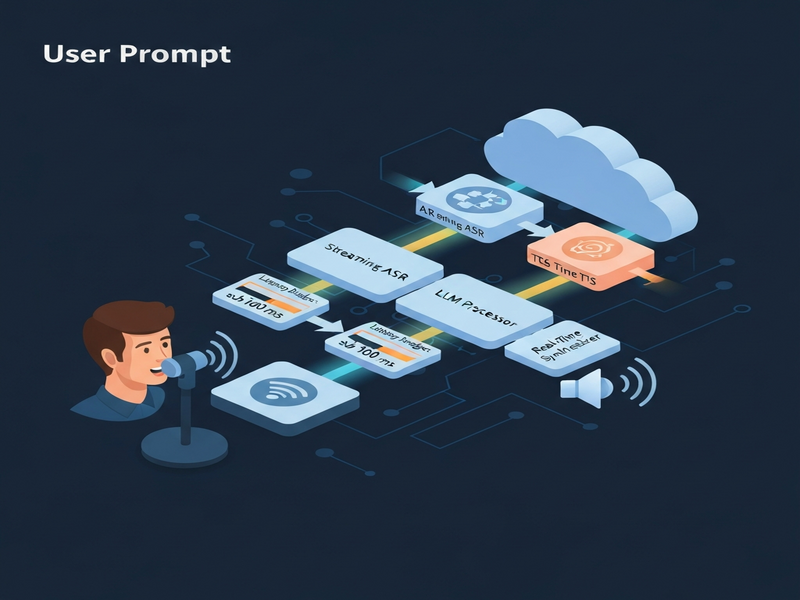
The diagram visualizes the asynchronous flow: audio chunks → streaming ASR → streaming LLM → streaming TTS → playback. Each arrow represents a non‑blocking coroutine, allowing the system to process multiple stages concurrently.
Essential Code Snippets You Can Copy‑Paste
# Latency data structures
@dataclass
class LatencyMetrics:
    audio_chunk_received: float = 0.0
    asr_started: float = 0.0
    asr_partial: float = 0.0
    asr_complete: float = 0.0
    llm_started: float = 0.0
    llm_first_token: float = 0.0
    llm_complete: float = 0.0
    tts_started: float = 0.0
    tts_first_chunk: float = 0.0
    tts_complete: float = 0.0

    def get_total_latency(self) -> float:
        return self.tts_complete - self.audio_chunk_received
# Streaming ASR mock
class StreamingASR:
    async def transcribe_stream(self, audio_stream, ground_truth):
        words = ground_truth.split()
        words_transcribed = 0
        async for chunk in audio_stream:
            await asyncio.sleep(self.latency_budget)   # simulate processing
            if words_transcribed < len(words):
                words_transcribed += 1
                yield " ".join(words[:words_transcribed]), False
        yield ground_truth, True
# Orchestrating the full turn
async def process_turn(self, user_input: str) -> LatencyMetrics:
    metrics = LatencyMetrics()
    start = time.time()
    metrics.audio_chunk_received = time.time() - start

    # Stream audio → ASR
    audio_gen = self.audio_stream.stream_audio(user_input)
    async for text, final in self.asr.transcribe_stream(audio_gen, user_input):
        if final:
            metrics.asr_complete = time.time() - start
            # LLM generation
            async for token in self.llm.generate_response(text):
                if not metrics.llm_first_token:
                    metrics.llm_first_token = time.time() - start
                # TTS streaming
                async for _ in self.tts.synthesize_stream(self._token_stream(token)):
                    if not metrics.tts_first_chunk:
                        metrics.tts_first_chunk = time.time() - start
    metrics.tts_complete = time.time() - start
    return metrics
These snippets illustrate the minimal scaffolding required to reproduce the tutorial’s results. Replace the mock implementations with production‑grade services (e.g., Whisper for ASR, GPT‑4o for LLM, and ElevenLabs for TTS) to build a commercial‑ready voice assistant.
Benefits & Use‑Cases of a Fully‑Streaming Voice Agent
- Instantaneous feedback: Call‑center bots can acknowledge a user’s request while still listening, reducing abandonment rates.
- Low‑bandwidth environments: Streaming ASR and TTS work on chunked audio, making the system viable on 3G/4G networks.
- Multi‑modal assistants: Combine voice with chat or visual UI; the same latency budgets apply to each modality.
- Edge deployment: By quantizing models and enforcing strict budgets, the pipeline can run on edge devices for privacy‑first applications.
- Continuous improvement: The
LatencyMetricslog enables automated A/B testing and regression monitoring.
Start Building Your Voice AI with UBOS
UBOS provides a complete stack to accelerate every step of the streaming voice agent workflow:
- Explore the UBOS platform overview for a low‑code environment that hosts ASR, LLM, and TTS services.
- Kick‑start your project with UBOS templates for quick start, including a GPT‑Powered Telegram Bot that you can adapt for voice.
- Integrate cutting‑edge voice synthesis via the ElevenLabs AI voice integration.
- Leverage OpenAI ChatGPT integration for powerful LLM reasoning.
- Store conversation embeddings with the Chroma DB integration for fast retrieval.
- Automate end‑to‑end workflows using the Workflow automation studio.
- Design custom UI components in the Web app editor on UBOS.
- Scale from startup to enterprise with UBOS for startups and Enterprise AI platform by UBOS.
- Check pricing flexibility at UBOS pricing plans and join the UBOS partner program for co‑marketing opportunities.
Whether you need a voice‑first chatbot, an AI‑driven call‑center assistant, or a multilingual virtual guide, UBOS’s modular ecosystem lets you assemble, test, and deploy in days instead of months.
Original Tutorial Reference
The concepts and code excerpts above are based on the in‑depth tutorial published by MarkTechPost. For the full source code and additional commentary, visit the original article:
Designing a Fully Streaming Voice Agent with End‑to‑End Latency Budgets
Further Reading on UBOS Voice Solutions
- Voice Agent Architecture – deep dive into component interactions.
- AI Voice Solutions – case studies across industries.
- AI Audio Transcription and Analysis – turn raw speech into searchable text.
- AI Video Generator – combine voice output with visual content.
- AI Chatbot template – a ready‑made conversational UI.
By applying strict latency budgets and leveraging UBOS’s integrated AI services, developers can deliver voice assistants that feel as natural as a human conversation—fast, fluid, and always on.