

- Updated: January 7, 2026
- 6 min read
Introducing the NEO GEAR BTW Parametric Gear Generator
Answer: The NEO GEAR BTW parametric gear generator is a web‑based design tool that instantly creates fully customizable gear models—complete with precise dimensions, tooth geometry, and exportable 3D files—tailored for mechanical engineers, gear designers, and product developers.
What Is the NEO GEAR BTW Parametric Gear Generator?
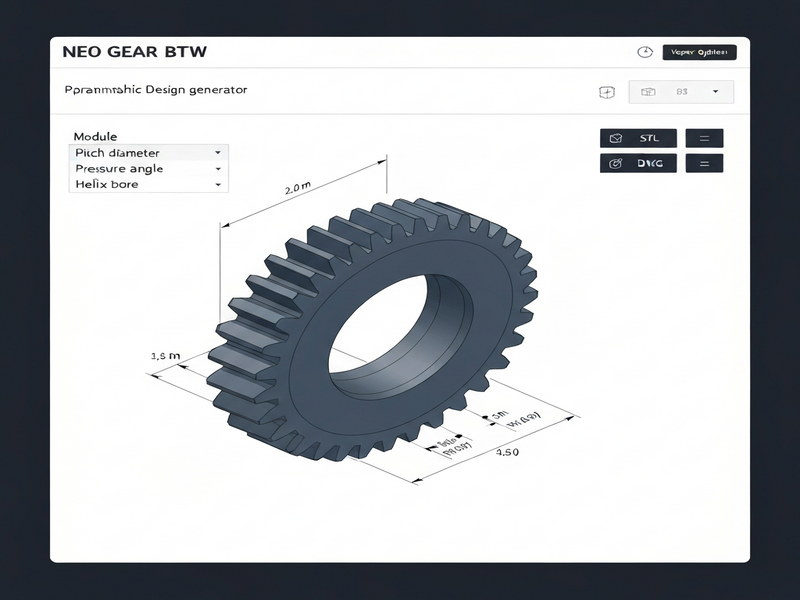
NEO GEAR BTW is a parametric gear solution built on the UBOS platform overview. By adjusting a handful of numeric inputs—module, teeth count, helix angle, shaft bore, and more—the tool computes every critical gear dimension in real time. The result is a ready‑to‑manufacture 3D model that can be exported as STL or 3MF, eliminating manual calculations and reducing design errors.
Key Features of NEO GEAR BTW
- Full parametric control: Every gear attribute—from module to profile shift—is editable, enabling truly custom gear designs.
- Instant dimension calculation: The engine instantly derives pitch diameter, outer diameter, root diameter, base diameter, and circular pitch.
- Helical and spur options: Set the helix angle to 0° for spur gears or up to 45° for helical gears.
- Export ready files: One‑click export to STL or 3MF for rapid prototyping or CNC machining.
- Integrated with AI workflows: Seamlessly connect gear data to AI marketing agents for automated documentation or BOM generation.
- Responsive UI: Built with modern Tailwind CSS components for a clean, mobile‑friendly experience.
Technical Specifications
The following table summarizes the core parameters and the automatically calculated dimensions for a typical NEO GEAR BTW configuration.
| Parameter | Value | Description |
|---|---|---|
| Module (mm) | 0.325 | Fundamental size of the gear tooth. |
| Teeth Count | 42 | Number of teeth on the gear. |
| Pressure Angle (°) | 14.5 | Angle of tooth engagement force. |
| Backlash (mm) | 0.02 | Gap between mating teeth. |
| Clearance (×m) | 0.05 | Root clearance factor. |
| Profile Shift (×m) | -1 | Controls tooth thickness and strength. |
| Shaft Bore (mm) | 4.425 | Central hole diameter for the shaft. |
| Face Width (mm) | 10 | Gear face width (thickness). |
| Helix Angle (°) | 4.5 | Angle for helical gears (0 = spur). |
| Pitch Diameter (mm) | 64.00 | Calculated from module × teeth count. |
| Outer Diameter (mm) | 68.00 | Diameter at tooth tips. |
| Root Diameter (mm) | 58.00 | Diameter at the base of the teeth. |
| Base Diameter (mm) | 60.14 | Diameter used for involute profile generation. |
| Tooth Height (mm) | 5.00 | Vertical height of each tooth. |
| Circular Pitch (mm) | 6.28 | Arc length between corresponding points on adjacent teeth. |
Benefits and Real‑World Applications
For mechanical engineers and product developers, the NEO GEAR BTW generator delivers tangible advantages:
- Speed to market: Design, validate, and export a gear in under five minutes, cutting weeks off the development cycle.
- Error reduction: Automated calculations eliminate manual spreadsheet mistakes.
- Design flexibility: Quickly iterate on module, tooth count, or helix angle to explore performance trade‑offs.
- Seamless integration: Exported files can be fed directly into Workflow automation studio for downstream CNC or 3‑D printing pipelines.
- Documentation automation: Pair gear specs with the AI marketing agents to auto‑generate technical datasheets, BOMs, and compliance reports.
- Cost efficiency: Reduce prototype iterations by validating geometry before any physical build.
Typical use cases include:
- Automotive transmission design – custom gear ratios for electric drivetrains.
- Robotics – lightweight, high‑torque spur or helical gears for joint actuation.
- Industrial machinery – replacement parts for legacy equipment where original drawings are unavailable.
- Additive manufacturing – optimized gear profiles for 3‑D printed polymer gears.
Step‑by‑Step Guide: Using the Gear Generator Tool
Below is a concise workflow that any engineer can follow, even without prior CAD experience.
- Access the tool: Navigate to the NEO GEAR BTW parametric gear generator page from the UBOS homepage.
- Enter base parameters: Fill in module, teeth count, pressure angle, and helix angle. The UI instantly updates the calculated dimensions.
- Adjust advanced settings (optional): Modify backlash, profile shift, and clearance to meet specific load or noise requirements.
- Preview the 3‑D model: Rotate, zoom, and inspect the gear in the embedded viewer. Use the Web app editor on UBOS to overlay annotations.
- Export the model: Click “Export STL” or “Export 3MF”. The file is ready for import into any CAM software.
- Integrate with downstream workflows: Upload the exported file to the Workflow automation studio to trigger CNC toolpath generation or 3‑D printing jobs.
- Document automatically: Use the AI marketing agents to produce a spec sheet that includes all calculated dimensions, material recommendations, and compliance notes.
Extending NEO GEAR BTW with UBOS AI Services
The true power of the generator emerges when it is combined with UBOS’s AI ecosystem. For example, you can feed the gear’s numeric data into the OpenAI ChatGPT integration to create natural‑language design summaries for stakeholders. Or, pair it with the Chroma DB integration to store and query thousands of gear configurations across projects.
For teams that rely on instant messaging, the Telegram integration on UBOS can push newly generated gear files directly to a channel, enabling rapid peer review. Adding the ChatGPT and Telegram integration further allows engineers to ask natural‑language questions like “What is the maximum torque for this gear?” and receive AI‑driven answers instantly.
Voice‑enabled workflows are also possible via the ElevenLabs AI voice integration, letting you dictate gear parameters hands‑free while the generator updates in real time.
Pricing, Support, and Community Resources
UBOS offers transparent pricing plans that include unlimited access to the gear generator, AI integrations, and the full suite of automation tools. For startups, the UBOS for startups tier provides additional credits for AI‑driven documentation. Small‑ and medium‑size businesses can benefit from the UBOS solutions for SMBs, which bundle the generator with dedicated support.
Enterprise customers looking for large‑scale deployment can explore the Enterprise AI platform by UBOS, which includes role‑based access, audit logs, and on‑premise deployment options.
Template Marketplace – Jump‑Start Your Gear Projects
UBOS’s UBOS templates for quick start include ready‑made workflows that combine the gear generator with downstream processes. Notable examples:
- AI SEO Analyzer – automatically generate SEO‑friendly documentation for gear catalogs.
- AI Article Copywriter – produce blog posts describing new gear designs.
- AI Video Generator – create short demo videos of the 3‑D gear rotating, perfect for marketing.
- AI Image Generator – generate high‑resolution renders for technical sheets.
Partner Program and Further Learning
Developers interested in extending the gear generator can join the UBOS partner program. Partners receive API keys, sandbox environments, and co‑marketing opportunities.
For deeper technical insight, explore the following community‑driven templates that showcase advanced AI‑enabled engineering workflows:
- GPT‑Powered Telegram Bot – integrate gear data with conversational bots.
- AI Audio Transcription and Analysis – turn design review meetings into searchable transcripts.
- Keywords Extraction with ChatGPT – automatically tag gear projects for internal search.
Conclusion & Call to Action
The NEO GEAR BTW parametric gear generator empowers mechanical engineers to move from concept to production with unprecedented speed and precision. By leveraging UBOS’s AI‑driven ecosystem—ranging from chat integrations to automated documentation—you can create, validate, and market custom gears faster than ever before.
Ready to design your first custom gear? Visit the NEO GEAR BTW tool today, explore the UBOS portfolio examples for inspiration, and join the partner program to unlock advanced API capabilities.
For a deeper dive into the original announcement and technical background, see the original source.
Andrii Bidochko
CTO UBOS
Andrii Bidochko is an AI entrepreneur and researcher focused on AI agents, reinforcement learning, and autonomous systems. He writes about the technologies shaping the future of machine intelligence, from frontier models and agent architectures to real-world AI applications.