

- Updated: December 28, 2025
- 5 min read
WalletWallet: Free Online Tool to Convert Barcodes and QR Codes into Apple Wallet Passes
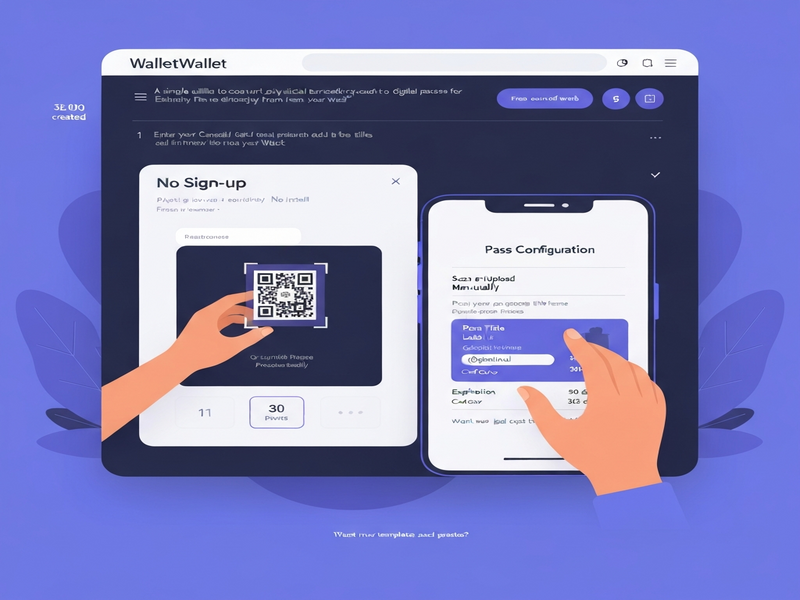
WalletWallet is a completely free, browser‑based tool that instantly transforms any physical barcode or QR code into a ready‑to‑use Apple Wallet pass (.pkpass) without requiring sign‑up, installation, or personal data collection.
1. Introduction to the WalletWallet Tool and Its Purpose
In an era where physical loyalty cards, event tickets, and coupons clutter wallets, WalletWallet offers a sleek, zero‑friction solution: convert a printed barcode or QR code into a native Apple Wallet pass in seconds. The service is designed for tech‑savvy individuals and businesses that want to digitize assets without the overhead of account creation or software downloads.
For organizations already leveraging AI‑driven platforms, the tool complements existing workflows. For example, the UBOS platform overview highlights how low‑code automation can integrate with external utilities like WalletWallet to streamline customer onboarding.
2. Core Features of WalletWallet
- Barcode/QR conversion: Upload an image or scan directly with your device’s camera; the tool reads the code locally in the browser.
- Full customization: Choose pass title, subtitle, background color, and optional expiration dates.
- .pkpass download: The generated file is ready for immediate import into Apple Wallet.
- No sign‑up required: All processing happens client‑side, preserving privacy.
- Instant preview: See a live mock‑up before downloading.
These capabilities align with the Enterprise AI platform by UBOS, which emphasizes secure, no‑code solutions that keep user data on the device.
3. Step‑by‑Step: How the Tool Works
- Scan or upload the code: Use the built‑in camera scanner or drag‑and‑drop an image of the barcode/QR code.
- Validate the data: The tool parses the numeric or alphanumeric string locally, ensuring no data leaves your browser.
- Configure appearance: Fill in optional fields such as Pass Title, Label, Value, and select a Card Color. You can also set an expiration period (e.g., 30 days, 90 days, 365 days) or leave it open‑ended.
- Generate the .pkpass file: Click “Create Pass” and the service instantly builds a standards‑compliant Apple Wallet file.
- Add to Apple Wallet: Open the downloaded file on an iPhone or iPad; the pass appears in the Wallet app ready for use.
Developers can embed this workflow into larger automation pipelines using the Workflow automation studio, enabling bulk pass generation for events or loyalty programs.
4. Benefits and Practical Use Cases
For Consumers
- Eliminate paper clutter – keep tickets, coupons, and loyalty cards in one digital place.
- Instant access – passes appear instantly after scanning, even offline.
- Privacy‑first – no account, no email, no tracking.
For Small Businesses
- Offer customers a DIY digital pass generator without building a custom app.
- Reduce printing costs and improve sustainability.
- Integrate with existing CRM via OpenAI ChatGPT integration for personalized messaging.
For Event Organizers
- Quickly convert printed tickets into scannable Apple Wallet passes.
- Set automatic expiration to keep the Wallet tidy after the event.
- Leverage the UBOS templates for quick start to create event‑specific branding.
For Enterprises
- Scale pass generation across multiple locations using the UBOS partner program.
- Combine with AI marketing agents to push targeted offers directly to users’ Wallets.
- Maintain compliance with corporate security policies via on‑device processing.
5. Comparison with Similar Solutions
| Feature | WalletWallet (Free) | Paid SaaS Pass Builders | Custom In‑House Development |
|---|---|---|---|
| Cost | Free | Subscription‑based | Development & maintenance budget |
| Sign‑up Required | No | Yes | Depends on implementation |
| Customization Depth | Basic (title, color, expiration) | Advanced (dynamic fields, API hooks) | Unlimited (full SDK) |
| Data Privacy | All processing client‑side | Server‑side processing (depends on provider) | Fully controllable by enterprise |
| Integration Ease | One‑click web UI | API & SDK required | Custom codebase |
If you need a quick, privacy‑first solution, WalletWallet stands out. For deeper branding or analytics, consider pairing it with the Web app editor on UBOS to build a custom front‑end that calls the free generator behind the scenes.
6. Get Started Now
Ready to digitize your barcodes and QR codes? Visit the official tool and start creating passes instantly:
While you’re exploring, you might also find these UBOS resources helpful for extending your digital strategy:
- About UBOS – learn how our AI‑first philosophy fuels innovation.
- UBOS pricing plans – discover affordable tiers for startups and SMBs.
- UBOS for startups – fast‑track your MVP with low‑code tools.
- UBOS solutions for SMBs – scale your loyalty program without heavy IT overhead.
- UBOS portfolio examples – see real‑world implementations of digital passes and more.
7. Conclusion: Why WalletWallet Matters
By delivering a free, no‑sign‑up, privacy‑preserving conversion from physical barcodes to Apple Wallet passes, WalletWallet fills a niche that many larger SaaS platforms overlook. Its simplicity makes it ideal for everyday users, while its compatibility with low‑code ecosystems like AI marketing agents and the UBOS partner program opens doors for businesses to embed the functionality into broader digital experiences.
Whether you’re a tech‑savvy consumer, a boutique retailer, or an enterprise looking to streamline ticketing, the tool offers a fast, secure, and cost‑effective path to Apple Wallet integration. Combine it with UBOS’s suite of AI‑driven services—such as the Telegram integration on UBOS or the Chroma DB integration—to create a truly end‑to‑end digital workflow.