

- Updated: January 17, 2026
- 6 min read
Self‑Hosting Made Easy with Claude Code: A 2026 Guide
Self‑hosting a home server is now within reach of any tech‑enthusiast thanks to affordable mini‑PCs, powerful CLI agents like Claude Code, and simple networking tools such as Tailscale.
Why Self‑Hosting Is Booming in 2026
In the past year, three forces have converged to make self‑hosting the default choice for personal cloud services:
- Mini‑PCs that fit in the palm of your hand, consume under 10 W, and cost less than $500.
- Tailscale, a zero‑config VPN that creates a private network across devices without opening ports.
- CLI agents like Claude Code that automate Docker, Caddy, and backup tasks from the terminal.
These trends turn a traditionally complex, sysadmin‑heavy hobby into a plug‑and‑play experience that even “normies” can enjoy.
Choosing the Right Mini‑PC for Your Home Server
When selecting hardware, focus on three criteria: size, power efficiency, and expandability.
Hand‑Held Powerhouses
Devices such as the Beelink Mini N150 or Intel NUC models deliver 4‑core CPUs, 8 GB RAM, and M.2 NVMe slots in a chassis that fits on a bookshelf. Prices range from $300‑$450, and they run silently 24/7.
Storage Strategy
Pair your mini‑PC with a high‑capacity NVMe SSD (e.g., 8 TB) for fast local access, and keep a secondary USB‑C external drive for daily snapshots. This hybrid approach balances speed and redundancy.
If you need a quick visual reference, the 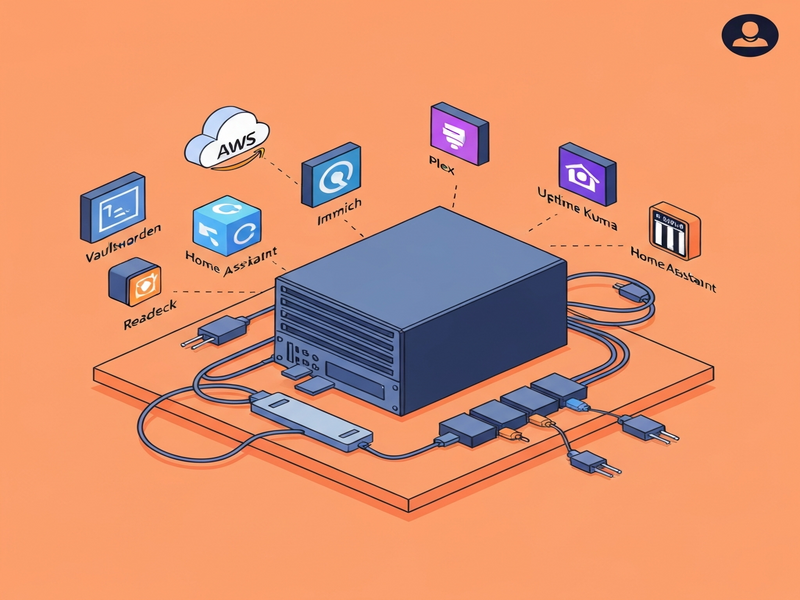 below illustrates a typical home‑server rack layout.
Step‑by‑Step Installation: Linux, Tailscale, and Claude Code
- Install Ubuntu Server 22.04 LTS – Flash the ISO to a USB stick, boot the mini‑PC, and follow the on‑screen prompts. Minimal installation keeps the footprint under 1 GB.
- Configure Tailscale – Run
curl -fsSL https://tailscale.com/install.sh | shand authenticate with your Google or Microsoft account. Your server now appears as a secure node on your private mesh. - Deploy Claude Code – Install the CLI agent directly on the server:
curl -sSL https://cli.ubos.tech/install.sh | bash. Once installed, launch it withclaude-codeand describe the services you want (e.g., “set up a Docker container for Vaultwarden”).
Claude Code translates natural language into Docker Compose files, Caddy configs, and systemd services, eliminating the need to memorize syntax.
Must‑Have Self‑Hosted Services
Below is a curated list of services that cover password management, media streaming, photo storage, monitoring, and home automation. All can be provisioned with a single Claude Code prompt.
Vaultwarden – Your Personal Password Vault
Vaultwarden is a lightweight, Rust‑based implementation of Bitwarden. It works with existing Bitwarden clients, giving you end‑to‑end encryption without a third‑party subscription.
Learn more about OpenAI ChatGPT integration for automated password generation.
Plex – Media Server with Hardware‑Accelerated Transcoding
Install Plex to stream movies, TV shows, and music to any device. Pair it with a Plex Pass for GPU‑accelerated transcoding on your mini‑PC.
For a quick start, check out the UBOS templates for quick start.
Immich – Self‑Hosted Photo Library
Immich replaces Google Photos with local storage, facial recognition, and mobile apps. It automatically backs up your phone roll and organizes images by date and location.
Combine Immich with the Chroma DB integration for fast vector search of your photo metadata.
Uptime Kuma – Service Monitoring
Uptime Kuma provides a sleek dashboard that pings your containers, sends email alerts, and logs downtime. It’s perfect for keeping an eye on Vaultwarden, Plex, and Home Assistant.
Explore the Workflow automation studio to trigger notifications when a service goes offline.
Caddy – Automatic TLS Reverse Proxy
Caddy automatically provisions HTTPS certificates via Let’s Encrypt and routes traffic to your Docker containers. No manual Nginx config required.
Read more about the Web app editor on UBOS for custom proxy rules.
Home Assistant – Smart Home Hub
Run Home Assistant to control lights, thermostats, and sensors. Its integration library grows daily, and you can expose it securely through Caddy.
Check the Enterprise AI platform by UBOS for advanced automation scenarios.
Readeck – Read‑It‑Later Service
Readeck replaces Pocket with an open‑source, ad‑free reading list that syncs across browsers and mobile devices.
Pair it with the AI Email Marketing template to get daily digests of saved articles.
Monitoring, Backup Strategies, and Disaster Recovery
Reliability is the final piece of the puzzle. Here’s a proven workflow:
- Local Snapshots – Attach a USB‑C SSD and schedule daily rsync snapshots via a Claude Code‑generated cron job.
- Remote Off‑Site Backups – Install the AWS CLI, create an IAM user with S3 write permissions, and let Claude Code configure a weekly
aws s3 syncto a bucket. For cold storage, enable Glacier Deep Archive (costs < $0.01 / GB / month). - Health Checks – Use Uptime Kuma to ping each container. When a failure occurs, a webhook triggers a Telegram alert via the Telegram integration on UBOS.
- Automated Restarts – Systemd ensures containers restart on boot, and Claude Code can add
Restart=alwaysdirectives automatically.
For a visual guide to setting up backups, see the original self‑hosting guide by Fulghum.
Boosting Your Server with AI‑Powered Tools
UBOS offers a suite of AI extensions that complement your self‑hosted stack:
- AI SEO Analyzer – Optimize your personal blog or documentation site directly from the server.
- AI Article Copywriter – Generate content for newsletters without leaving your home network.
- AI Video Generator – Turn your photo library (Immich) into automated video slideshows.
- AI Chatbot template – Deploy a personal assistant that can query your media library or answer FAQs.
- GPT‑Powered Telegram Bot – Receive real‑time server stats on your phone.
All these templates are available in the UBOS portfolio examples, showcasing real‑world deployments.
Pricing Snapshot: How Much Does It Really Cost?
Below is a quick breakdown of typical expenses for a hobbyist‑grade home server:
| Item | Estimated Cost (USD) |
|---|---|
| Mini‑PC (Beelink N150) | $379 |
| 8 TB NVMe SSD | $250 |
| External USB backup drive (2 TB) | $70 |
| AWS S3 Glacier (0.5 TB / yr) | $6 |
| UBOS pricing plans (optional SaaS layer) | Free‑tier / $9‑$49 /mo |
Even with optional SaaS add‑ons, the total first‑year investment stays under $800, a fraction of typical cloud subscription bundles.
Ready to Take Control? Start Your Self‑Hosting Journey Today
Whether you’re a startup founder, an SMB IT lead, or a hobbyist looking for privacy, the UBOS homepage offers a one‑stop portal for hardware guides, AI agents, and community support.
Explore the UBOS platform overview to see how the ecosystem integrates with your mini‑PC, then dive into the About UBOS page for the team behind the technology.
Join the UBOS partner program if you want to contribute templates or get early access to new AI agents.
Take the first step: flash Ubuntu, enable Tailscale, and let Claude Code spin up your first container. In less than an hour you’ll have a secure, private cloud that you truly own.