

- Updated: December 30, 2025
- 7 min read
How to Build a Robust Multi‑Agent Pipeline with Camel: A Comprehensive Guide
A robust multi‑agent pipeline can be built with the Camel framework by defining specialized agents (Planner, Researcher, Writer, Critic, Finalizer), orchestrating them through a JSON‑based contract, and adding lightweight persistent memory to retain context across runs.
Why Multi‑Agent Pipelines Matter and Where Camel Fits In
Modern AI research and enterprise automation demand more than a single LLM call. Complex tasks—such as literature reviews, data extraction, and report generation—benefit from a team of agents, each excelling at a narrow sub‑task. This multi‑agent pipeline approach reduces hallucinations, improves traceability, and scales with minimal human supervision.
The Camel integration (often stylized as CAMEL) provides a ready‑made scaffolding for such pipelines. It supplies a unified model factory, toolkits for web‑augmented reasoning, and a simple API to chain agents together. By leveraging Camel, AI researchers and technology decision‑makers can focus on domain logic instead of plumbing.
The Camel Framework: Core Components
Camel structures a pipeline around five contract‑first agents. Each agent receives a clear goal and a strict output schema, ensuring downstream agents can consume results without ambiguity.
Planner
The Planner’s job is to decompose a high‑level objective into a concise plan and a set of research questions. Its output is a JSON object containing plan, questions, and acceptance_criteria. By front‑loading the intent, the pipeline avoids drift later on.
Researcher
Equipped with a web‑search toolkit (e.g., DuckDuckGo or Bing), the Researcher answers each question, returning findings, sources, and any open_questions. This step grounds the pipeline in verifiable data, a crucial factor for AI research automation.
Writer
The Writer consumes the research JSON and produces a structured markdown brief. Its contract mandates “Markdown only,” which guarantees a clean hand‑off to the next stage.
Critic
The Critic reviews the draft for logical gaps, factual errors, or style inconsistencies. It returns a JSON with issues, fixes, and explicit rewrite_instructions. This feedback loop is the “augmented reasoning” that distinguishes Camel from naïve single‑prompt pipelines.
Finalizer
Finally, the Finalizer applies the Critic’s suggestions and emits the polished research brief. Because the Finalizer only outputs markdown, the result can be directly published or fed into downstream systems such as the Enterprise AI platform by UBOS.
Step‑by‑Step Technical Implementation
1. Environment Setup
Start with a clean Python environment. Install Camel with all optional dependencies, load your OpenAI key securely, and verify connectivity.
pip install "camel-ai[all]" "python-dotenv" "rich"Use python-dotenv to keep API keys out of source control:
from dotenv import load_dotenv
import os

load_dotenv()
os.environ["OPENAI_API_KEY"] = os.getenv("OPENAI_API_KEY")
2. Defining Agents with JSON Contracts
Each agent is instantiated via ChatAgent with a system prompt that embeds its role, goal, and output schema. Below is a helper that creates any agent on demand:
def make_agent(role: str, goal: str, extra_rules: str = "") -> ChatAgent:
    system = (
        f"You are {role}.\n"
        f"Goal: {goal}\n"
        f"{extra_rules}\n"
        "Output must be crisp, structured, and directly usable by the next agent."
    )
    return ChatAgent(model=model, system_message=system)
3. Adding Lightweight Persistent Memory
Persisting artifacts across runs enables “knowledge continuity.” A simple JSON file works well for prototypes:
MEM_PATH = "camel_memory.json"

def mem_load() -> dict:
    if not os.path.exists(MEM_PATH):
        return {"runs": []}
    with open(MEM_PATH, "r", encoding="utf-8") as f:
        return json.load(f)

def mem_save(mem: dict) -> None:
    with open(MEM_PATH, "w", encoding="utf-8") as f:
        json.dump(mem, f, indent=2)
After each pipeline execution, call mem_add_run(topic, artifacts) to archive the plan, research, draft, critique, and final brief.
4. Orchestrating the Workflow
The orchestration function strings together the agents, handling JSON parsing and fallback to raw text when needed. The pattern below follows a MECE (Mutually Exclusive, Collectively Exhaustive) design, ensuring each step has a single responsibility.
def run_workflow(topic: str) -> dict:
    plan = step_json(planner, f"Topic: {topic}\\nCreate a tight plan.")
    research = step_json(researcher, f"Research the topic using\\n{json.dumps(plan)}")
    draft = step_text(writer, f"Write a brief using\\n{json.dumps(research)}")
    critique = step_json(critic, f"Critique the draft:\\n{draft}")
    final = step_text(finalizer, f"Rewrite using critique:\\n{json.dumps(critique)}\\nDraft:\\n{draft}")

    artifacts = {
        "plan_json": json.dumps(plan, indent=2),
        "research_json": json.dumps(research, indent=2),
        "draft_md": draft,
        "critique_json": json.dumps(critique, indent=2),
        "final_md": final,
    }
    mem_add_run(topic, artifacts)
    return artifacts
5. Running a Sample Topic
Invoke the pipeline with any research question. For example:
TOPIC = "Impact of AI‑augmented workflow automation on mid‑size enterprises"
artifacts = run_workflow(TOPIC)
print(artifacts["final_md"])
Benefits for AI Research and Enterprise Automation
Adopting a Camel‑based multi‑agent pipeline yields tangible advantages:
- Reduced Hallucination: The Critic enforces factual consistency before final output.
- Scalable Collaboration: Adding new agents (e.g., a visualizer) is a matter of defining a new contract.
- Traceable Provenance: Persistent memory logs every artifact, satisfying compliance and audit requirements.
- Rapid Prototyping: With Camel’s model factory, swapping between GPT‑4, Claude, or open‑source models is a single‑line change.
- Enterprise Integration: Outputs can be fed directly into UBOS’s Workflow automation studio or the Web app editor on UBOS for downstream actions.
Illustration of the Camel Pipeline
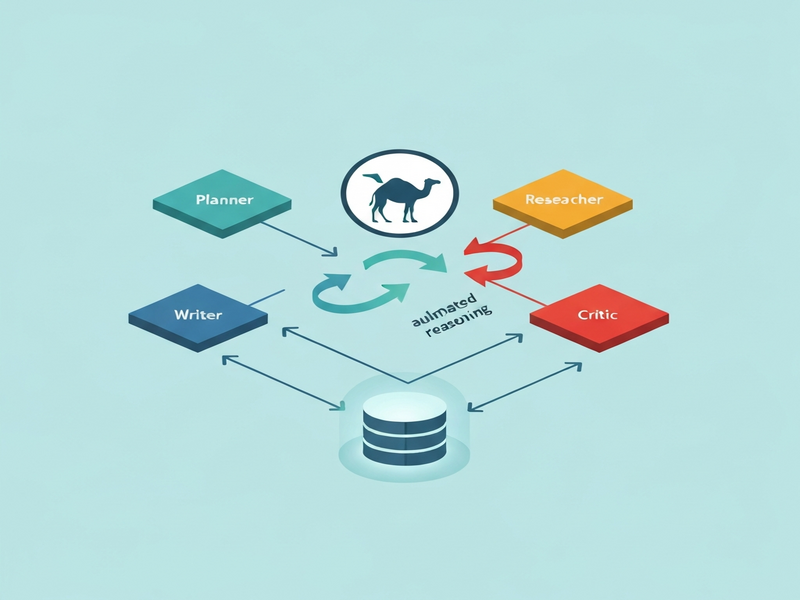
Figure: Data flow from Planner → Researcher → Writer → Critic → Finalizer, with persistent memory looping back to the Planner.
Extend Your Pipeline with UBOS Solutions
Once the core pipeline is stable, you can enrich it with UBOS’s ecosystem:
- UBOS homepage – discover the full suite of AI‑enabled products.
- UBOS platform overview – understand how the platform unifies data, models, and orchestration.
- AI marketing agents – plug in pre‑built agents for content generation, SEO, and social media.
- UBOS partner program – collaborate with UBOS to co‑sell or co‑develop advanced pipelines.
- UBOS pricing plans – choose a plan that matches your compute and support needs.
- UBOS templates for quick start – bootstrap new agents with ready‑made templates like AI SEO Analyzer.
- Workflow automation studio – visually design, monitor, and version your Camel pipelines.
- Web app editor on UBOS – embed the pipeline into a custom dashboard for internal stakeholders.
- Enterprise AI platform by UBOS – scale pipelines to thousands of concurrent runs with enterprise‑grade security.
- UBOS for startups – accelerate product‑market fit with AI‑driven research loops.
- UBOS solutions for SMBs – affordable automation for small teams.
- ChatGPT and Telegram integration – push pipeline results directly to a Telegram channel for instant stakeholder alerts.
Original Source
The concepts and code snippets in this guide are adapted from the in‑depth tutorial originally published by MarkTechPost. For the full original article, visit MarkTechPost’s coverage of Camel pipelines.
Conclusion: Your Next Steps
Building a multi‑agent pipeline with Camel transforms a vague research question into a rigorously vetted, publish‑ready brief—all while preserving provenance and enabling future reuse. By coupling Camel with UBOS’s Enterprise AI platform, you gain a production‑grade environment that scales from a single notebook to enterprise workloads.
Ready to accelerate your AI research or automate knowledge‑intensive workflows? Contact UBOS today to schedule a demo, explore the partner program, or start a free trial using the UBOS templates for quick start. The future of collaborative AI is here—let Camel and UBOS guide you there.