

- Updated: March 15, 2026
- 7 min read
Building Type‑Safe, Schema‑Constrained LLM Pipelines with Outlines and Pydantic
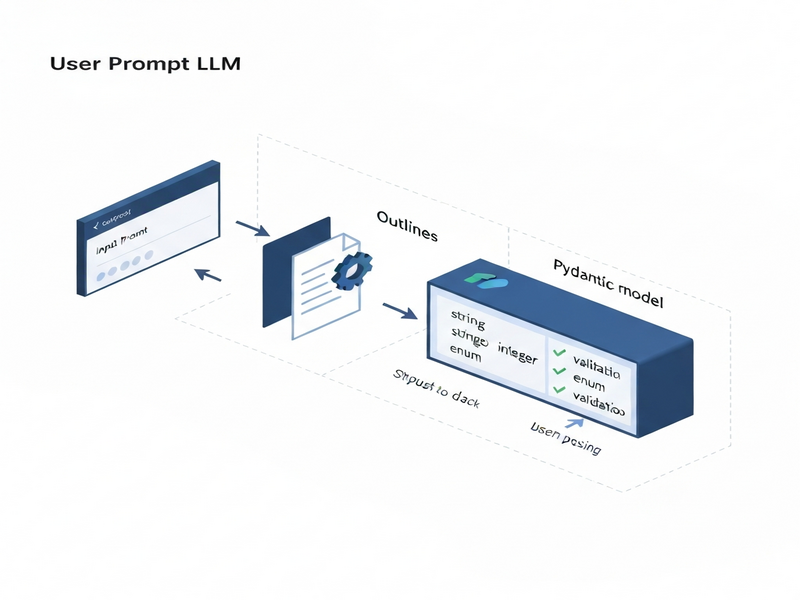
Type‑safe, schema‑constrained LLM pipelines are built by combining the Outlines library for prompt templating with Pydantic models for strict schema validation, enabling function‑driven, production‑grade AI workflows.
Why type‑safe LLM pipelines matter today
Large Language Models (LLMs) are powerful, but their raw output is often noisy, ambiguous, or outright invalid for downstream systems. When you need reliable JSON, precise numeric values, or arguments for a Python function, a type‑safe pipeline guarantees that the model respects the contract you defined. This eliminates costly post‑processing, reduces bugs in production, and aligns AI behavior with AI workflow automation standards.
In the SaaS world, developers, data scientists, and tech marketers are increasingly demanding pipelines that can be schema‑constrained and function‑driven. The combination of UBOS homepage and modern Python tooling makes this achievable without reinventing the wheel.
What is a type‑safe LLM pipeline?
A type‑safe pipeline enforces three layers of control:
- Prompt contract: The model is asked to produce output that matches a declared type (e.g.,
Literal["Positive","Negative"]). - Schema contract: A Pydantic model describes the exact JSON shape, field constraints, and validation rules.
- Execution contract: The validated data is passed to a Python function, guaranteeing safe execution.
By stacking these contracts, you move from “best‑effort” generation to deterministic, production‑ready behavior.
Outlines library – the glue for prompt templating and typed generation
Outlines is a lightweight Python wrapper around HuggingFace models that adds:
- Typed generation APIs (e.g.,
model(prompt, int)). - Template objects that keep system/user roles intact.
- Automatic token‑level streaming for low‑latency responses.
The library’s Template class lets you embed variables directly into a prompt while preserving the exact format required by the LLM. This eliminates manual string concatenation errors and makes the pipeline MECE‑compliant.
For developers who prefer a visual builder, the Workflow automation studio on UBOS offers a drag‑and‑drop interface that generates the same Outlines code behind the scenes.
Why Pydantic is the go‑to for schema validation
Pydantic provides a declarative way to describe JSON structures with Python type hints. It supports:
- Enums and
Literalfor closed vocabularies. - Regex patterns for strings (e.g., IPv4 addresses).
- Field constraints such as
min_length,max_items, and numeric ranges. - Automatic conversion from raw JSON strings to Python objects.
Defining enums, regex, and field constraints
Below is a compact example that you can copy‑paste into a notebook. It demonstrates a ticket schema with strict validation:
from enum import Enum
from typing import Literal, List
from pydantic import BaseModel, Field

class TicketPriority(str, Enum):
    low = "low"
    medium = "medium"
    high = "high"
    urgent = "urgent"

class ServiceTicket(BaseModel):
    priority: TicketPriority
    category: Literal["billing", "login", "bug", "feature_request", "other"]
    requires_manager: bool
    summary: str = Field(min_length=10, max_length=220)
    action_items: List[str] = Field(min_items=1, max_items=6)
When the LLM returns JSON, you simply call ServiceTicket.model_validate_json(json_str). If the output violates any rule, Pydantic raises a clear error that you can catch and ask the model to retry.
The UBOS partner program includes pre‑built Pydantic schemas for common SaaS use‑cases, saving you hours of modeling work.
Function‑driven LLM pipelines: from schema to execution
Once you have a validated Pydantic object, you can feed its fields directly into a Python function. This pattern mirrors the “function calling” feature of modern LLM APIs but stays fully on‑premise.
from pydantic import BaseModel, Field

class AddArgs(BaseModel):
    a: int = Field(ge=-1000, le=1000)
    b: int = Field(ge=-1000, le=1000)

def add(a: int, b: int) -> int:
    return a + b

# LLM generates JSON matching AddArgs
args_json = model(prompt, AddArgs, max_new_tokens=80)
args = AddArgs.model_validate_json(args_json)

result = add(args.a, args.b)
print(f"Result: {result}")
The Enterprise AI platform by UBOS can host such pipelines as micro‑services, exposing them via REST or GraphQL endpoints for downstream applications.
Full walkthrough: building a schema‑constrained pipeline with Outlines & Pydantic
1️⃣ Install dependencies and load a model
pip install outlines transformers pydantic
import torch, outlines
from transformers import AutoTokenizer, AutoModelForCausalLM

MODEL = "HuggingFaceTB/SmolLM2-135M-Instruct"
tokenizer = AutoTokenizer.from_pretrained(MODEL, use_fast=True)
hf_model = AutoModelForCausalLM.from_pretrained(
    MODEL,
    torch_dtype=torch.float16 if torch.cuda.is_available() else torch.float32,
    device_map="auto"
)
model = outlines.from_transformers(hf_model, tokenizer)
2️⃣ Define a prompt template with Outlines
import textwrap, outlines

tmpl = outlines.Template.from_string(textwrap.dedent("""
     You are a strict data extractor.
     Extract a ServiceTicket from the email below.
    {{ email }}

""").strip())
3️⃣ Generate JSON and validate with Pydantic
email = """Subject: URGENT - Cannot access my account...
    (email body omitted for brevity)"""

raw_json = model(tmpl(email=email), ServiceTicket, max_new_tokens=240)
ticket = ServiceTicket.model_validate_json(raw_json)
print(ticket.json(indent=2))
If the model truncates or returns malformed JSON, a tiny helper called safe_validate (shown in the original tutorial) can repair the string before Pydantic validation.
4️⃣ Hook the result into a function
def route_ticket(ticket: ServiceTicket):
    if ticket.priority == "urgent":
        # forward to on‑call engineer
        notify_engineer(ticket)
    else:
        # normal SLA handling
        enqueue(ticket)

route_ticket(ticket)
The entire flow runs in under a second on a modest GPU, making it suitable for real‑time chatbots, ticket triage systems, or automated compliance checks.
Benefits of type‑safe, schema‑constrained pipelines
- Reliability: Guarantees that downstream services receive data that matches the expected contract.
- Security: Prevents injection attacks by validating all inputs before execution.
- Speed to market: Reusable templates and schemas accelerate feature rollout.
- Observability: Errors are caught at the schema layer, providing clear logs for debugging.
- Cost efficiency: Reduces the need for expensive post‑processing pipelines.
Real‑world scenarios
- Customer‑support ticket triage (as demonstrated above).
- Financial report generation where numeric precision is mandatory.
- Dynamic content personalization where a model decides which UI component to render based on a validated schema.
- Multi‑modal AI assistants that call external APIs only after schema validation.
UBOS: a one‑stop shop for building and deploying type‑safe LLM pipelines
The UBOS platform overview bundles everything you need:
- Pre‑configured Outlines environments: Spin up a notebook with GPU support in seconds.
- Template marketplace: Jump‑start projects with UBOS templates for quick start, such as the AI Article Copywriter or the AI SEO Analyzer.
- Integrated OpenAI ChatGPT integration and Chroma DB integration: Store embeddings for retrieval‑augmented generation.
- Voice capabilities: Add spoken responses with the ElevenLabs AI voice integration.
- Collaboration tools: Connect your bots to Telegram via the Telegram integration on UBOS or even combine it with ChatGPT and Telegram integration for real‑time alerts.
Whether you are a UBOS for startups looking for rapid prototyping, or an UBOS solutions for SMBs that need compliance‑grade pipelines, the platform scales with you.
For teams that want to showcase AI‑enhanced marketing, the AI marketing agents can be wired to the same schema‑validated back‑end, ensuring every generated copy passes the Before‑After‑Bridge copywriting template without manual review.
Pricing is transparent; see the UBOS pricing plans for pay‑as‑you‑go or enterprise tiers.
Next steps
Ready to turn your LLM experiments into production‑grade pipelines? Start by exploring the Web app editor on UBOS, clone the Talk with Claude AI app template, and replace the model with your own Outlines‑based workflow.
For a deeper dive into the original tutorial that inspired this guide, read the original MarkTechPost article. It provides additional benchmarks and a full code repository.
Unlock the full potential of type‑safe AI today—UBOS makes it effortless.
Andrii Bidochko
CTO UBOS
Andrii Bidochko is an AI entrepreneur and researcher focused on AI agents, reinforcement learning, and autonomous systems. He writes about the technologies shaping the future of machine intelligence, from frontier models and agent architectures to real-world AI applications.