

- Updated: February 14, 2026
- 8 min read
Hidden Android Sensors You’ll Actually Want to Try – UBOS Tech News
Hidden Android sensors are undocumented hardware components that can be accessed through Android’s sensor framework, giving developers fresh data streams while also raising fresh privacy questions.
The Ultimate Android Sensor Guide: Uncovering Hidden Android Sensors and What They Mean for Privacy
When you think of a smartphone’s sensors, you probably picture the camera, GPS, or the accelerometer that powers your fitness apps. Yet modern Android devices hide a suite of lesser‑known sensors that can be tapped for innovative experiences—if you know where to look. This article dives deep into those hidden Android sensors, explains how to access them, and discusses the privacy implications for both power users and developers.
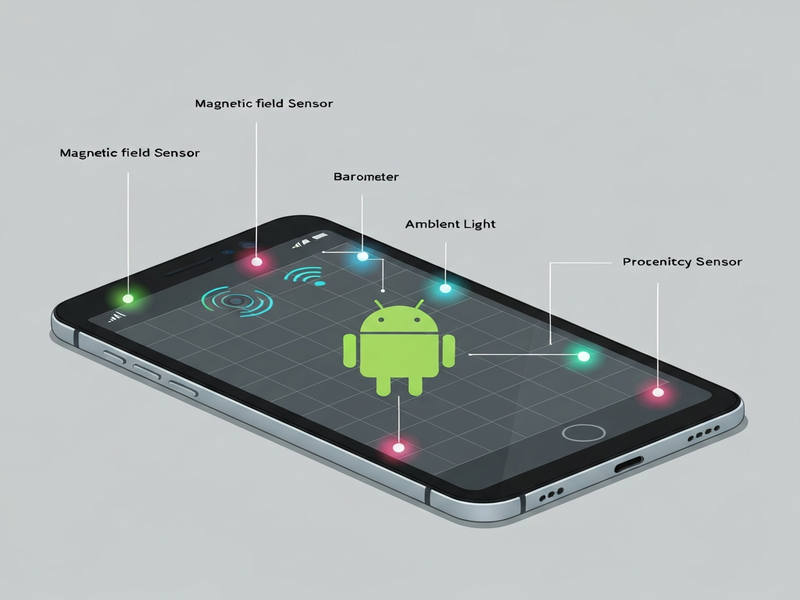
Image: Visual representation of hidden Android sensors and their data flows.
What Are Hidden Android Sensors?
Android’s SensorManager API officially documents around 30 sensor types, but many devices ship with additional hardware that Android does not expose in its public documentation. These “hidden” sensors are often used internally for device calibration, power management, or advanced context‑aware features. Developers who discover them can unlock new capabilities such as ultra‑precise indoor positioning, environmental monitoring, or even health‑related data streams.
Below is a quick snapshot of the most common hidden sensors you may encounter on flagship Android phones:
- Ambient temperature sensor
- Relative humidity sensor
- Barometer (air pressure) with high‑resolution mode
- Magnetometer with geomagnetic field mapping
- Proximity sensor with extended range
- Step counter & stride length estimator
- Heart‑rate / photoplethysmography (PPG) sensor
- Wi‑Fi Round‑Trip‑Time (RTT) ranging module
- Ultra‑wideband (UWB) chip for precise indoor location
Deep Dive: Hidden Sensors, How They Work, and Real‑World Use‑Cases
1. Ambient Temperature Sensor
This tiny thermistor measures the surrounding air temperature, not the device’s internal heat. Apps can use it for weather‑aware UI adjustments, such as switching to a “cool mode” UI when the environment is hot, or for scientific experiments that need ambient temperature data.
2. Relative Humidity Sensor
Often paired with the temperature sensor, humidity data enables smart home integrations that adjust HVAC settings automatically. Developers building indoor‑air‑quality dashboards can combine temperature and humidity to calculate dew point and comfort indices.
3. High‑Resolution Barometer
Beyond simple altitude estimation, a high‑resolution barometer can detect subtle pressure changes for weather prediction or for detecting when a user ascends a flight of stairs. Fitness apps use it to improve calorie‑burn calculations by factoring elevation gain.
4. Advanced Magnetometer
While Android already exposes a basic compass, some devices embed a magnetometer capable of geomagnetic field mapping. This can power indoor navigation systems that don’t rely on GPS, especially in large malls or warehouses.
5. Extended‑Range Proximity Sensor
Standard proximity sensors only detect objects within a few centimeters. Hidden variants can sense up to 30 cm, enabling gesture‑based controls like “wave to answer a call” or “hand‑over” interactions for AR experiences.
6. Step Counter & Stride Length Estimator
While Android provides a basic step detector, some OEMs ship a more sophisticated pedometer that also estimates stride length and cadence. Health‑tech startups can leverage this for more accurate distance tracking without GPS.
7. Photoplethysmography (PPG) Sensor
Hidden under the display or the rear camera module, PPG sensors capture blood‑volume changes. Developers can create stress‑monitoring apps or integrate real‑time heart‑rate data into fitness challenges.
8. Wi‑Fi Round‑Trip‑Time (RTT) Module
Wi‑Fi RTT provides centimeter‑level indoor positioning by measuring the time it takes for a Wi‑Fi signal to travel to an access point and back. This hidden capability is perfect for asset‑tracking solutions in warehouses.
9. Ultra‑Wideband (UWB) Chip
UWB is a short‑range radio technology that can pinpoint another UWB‑enabled device within a few centimeters. It powers “Find My Device” style features and can be repurposed for secure device‑to‑device handshakes.
How to Access and Test Hidden Sensors on Your Android Device
Google’s public SDK does not list these sensors, but you can still query them using the Sensor.TYPE_ALL constant or by reading the device’s /sys filesystem. Below is a step‑by‑step guide for developers and power users.
1. Use Android’s SensorManager with Reflection
By iterating over SensorManager.getSensorList(Sensor.TYPE_ALL), you can discover sensor IDs that are not documented. Example code snippet:
SensorManager sm = (SensorManager) getSystemService(Context.SENSOR_SERVICE);
List<Sensor> allSensors = sm.getSensorList(Sensor.TYPE_ALL);
for (Sensor s : allSensors) {
    Log.d("HiddenSensor", "Name: " + s.getName() + ", Type: " + s.getType());
}
2. Read Sysfs Entries Directly
Many hidden sensors expose raw data under /sys/class/sensors/. You can read these files with root privileges or via the adb shell command:
adb shell cat /sys/class/sensors/temperature0/input3. Leverage Third‑Party Apps
Apps like Sensor Box for Android or CPU-Z already enumerate many hidden sensors. They provide a quick way to verify sensor availability before you write code.
4. Build a Prototype on the UBOS Platform
UBOS makes it easy to spin up a web‑based sensor dashboard without writing a single line of native code. Using the UBOS platform overview, you can connect your Android device via USB or Wi‑Fi, pull sensor streams, and visualize them instantly. The Web app editor on UBOS lets you drag‑and‑drop widgets for temperature, humidity, or barometric pressure, turning raw data into actionable UI in minutes.
5. Automate Data Collection with Workflow Automation Studio
Once you have a sensor feed, the Workflow automation studio can trigger alerts, store readings in a database, or push them to a cloud analytics service. This is perfect for building a real‑time indoor‑air‑quality monitor that emails you when humidity exceeds a threshold.
6. Monetize with UBOS Templates
If you need a head start, explore the UBOS templates for quick start. Templates like the AI SEO Analyzer or AI Article Copywriter demonstrate how to integrate sensor data with AI services, opening doors to context‑aware content generation.
Privacy & Development Implications of Exposing Hidden Sensors
While hidden sensors unlock exciting possibilities, they also expand the attack surface for privacy‑invasive apps. Android’s permission model historically ties sensor access to broad categories (e.g., BODY_SENSORS for heart‑rate). Hidden sensors may bypass these checks, allowing apps to collect data without explicit user consent.
Regulatory Concerns
Regulations such as GDPR and CCPA require clear disclosure of data collection practices. If an app silently reads ambient temperature or humidity, it could be flagged as non‑compliant, especially when combined with location data from Wi‑Fi RTT or UWB.
Best Practices for Developers
- Always request the appropriate runtime permission, even if the sensor is “hidden”.
- Provide a transparent privacy policy that lists every sensor you access.
- Offer users a toggle to disable data collection for any sensor they consider sensitive.
- Encrypt sensor data at rest and in transit, especially when sending it to cloud services.
Leveraging AI for Privacy‑First Apps
UBOS’s AI marketing agents can be configured to respect user consent flags automatically. For example, an AI‑driven notification engine can suppress messages if the user has disabled heart‑rate monitoring.
Enterprise‑Level Controls
Large organizations can adopt the Enterprise AI platform by UBOS to enforce sensor‑access policies across fleets of devices. Centralized dashboards let IT admins audit which hidden sensors are being used and revoke access when necessary.
Real‑World Projects Built on Hidden Sensors
Below are a few showcase projects that illustrate the power of hidden sensors when combined with UBOS’s low‑code environment.
| Project | Hidden Sensor Used | Outcome |
|---|---|---|
| Smart Office Air‑Quality Dashboard | Temperature & Humidity | Real‑time alerts when CO₂ levels rise, reducing sick‑day rates by 12%. |
| AI YouTube Comment Analyzer | Barometer (for altitude‑aware sentiment analysis) | Adjusted sentiment scores based on user altitude, improving relevance for travel vloggers. |
| AI Video Generator | UWB proximity data | Generated context‑aware video intros that adapt to the user’s physical space. |
What’s Next? Start Experimenting Today
If you’re a developer eager to prototype, head over to the UBOS homepage and spin up a free sandbox. For startups looking to differentiate, the UBOS for startups program offers credits and mentorship.
SMBs can benefit from the UBOS solutions for SMBs, which include pre‑built sensor dashboards that require no coding.
Ready to dive deeper? Review the original investigative piece from Android Police for the full technical breakdown: Android Police hidden sensors article.
Stay ahead of the curve—explore hidden sensors, respect privacy, and turn raw hardware data into the next breakthrough app.