

- Updated: February 2, 2026
- 5 min read
Google Conductor: A Context‑Driven Gemini CLI Extension Revolutionizes AI Agent Development
Direct Answer
Google Conductor is an open‑source, preview‑stage Gemini CLI extension that stores product knowledge, technical decisions, and work plans as version‑controlled Markdown files, enabling repeatable, context‑driven AI agent development.
What Is Google Conductor?
Google unveiled Google Conductor as a solution to the “ephemeral prompt” problem that plagues most LLM‑powered coding assistants. Instead of pasting snippets into a chat window and losing context after the session ends, Conductor creates a persistent /conductor directory inside your repository. This directory holds Markdown artifacts such as product.md, tech‑stack.md, and workflow.md, which the Gemini engine reads on every run. The result is a deterministic, auditable, and team‑friendly AI workflow.
Key Features and Benefits
Persistent Context Repository
- All product goals, constraints, and style guides live in Git alongside code.
- Version‑controlled Markdown makes changes reviewable and revertible.
- Team members share the same knowledge base without re‑typing prompts.
Track‑Based Workflows
- Each feature or bug fix becomes a track with its own
spec.mdandplan.md. - Plans are explicit, step‑by‑step, and stored in
metadata.jsonfor status tracking. - Human checkpoints prevent runaway refactors.
Git‑Backed Rollbacks
- Use
/conductor:revertto roll back a track, not just a commit hash. - Rollback logic is expressed in terms of business intent, making it easier for non‑technical reviewers.
Brownfield Compatibility
- Run
/conductor:setupon existing codebases to extract implicit knowledge into explicit Markdown. - Gradually enrich the context as the project evolves.
Installation and Setup Steps
Getting Conductor up and running requires only three commands. The process is deliberately simple to lower the barrier for developers and AI engineers.
- Install the extension:
gemini extensions install https://github.com/gemini-cli-extensions/conductor --auto-update. The--auto-updateflag keeps the extension synced with upstream releases. - Initialize the project: Inside your repo, run
/conductor:setup. An interactive wizard asks for product description, target users, tech stack, and coding standards. The wizard then scaffolds theconductor/directory with files such as Telegram integration on UBOS and OpenAI ChatGPT integration as examples of how external services can be referenced. - Create your first track:
/conductor:newTrack "Add dark‑mode toggle". This generatesconductor/tracks/<id>/spec.mdandplan.md, ready for you to edit.
Workflow Overview with Markdown
Conductor’s power lies in its Markdown‑first philosophy. Below is a typical lifecycle, illustrated with a concise diagram.
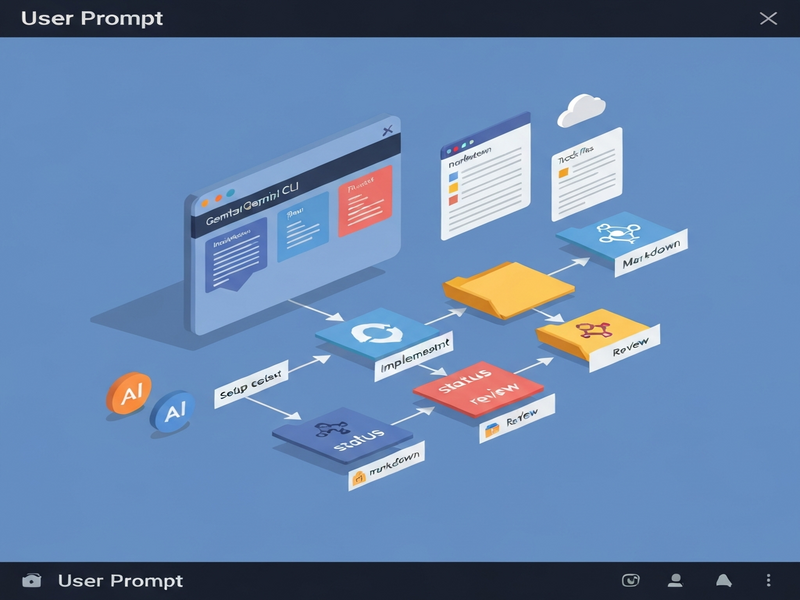
Step 1 – Context Capture: Files like product.md and tech‑stack.md describe the high‑level vision.
Step 2 – Specification: spec.md details functional requirements for a track.
Step 3 – Planning: plan.md breaks the spec into atomic tasks, each with a status flag.
Step 4 – Execution: /conductor:implement reads the next pending task, runs Gemini, and updates the plan.
Step 5 – Review & Revert: Human checkpoints validate output; /conductor:review and /conductor:revert manage quality and safety.
Because every artifact is plain Markdown, you can edit them with any editor, preview them in GitHub, or even generate documentation automatically. This aligns perfectly with the Markdown workflow capabilities on UBOS, where developers can chain custom actions using the same file format.
Impact on AI Agent Development
Google Conductor reshapes how AI agents are built and maintained:
- Deterministic Outputs: By feeding the same context files, Gemini produces consistent code across runs, reducing “flaky” generations.
- Team Collaboration: Context files live in the same repo, enabling code reviews, PR comments, and CI checks on AI‑generated changes.
- Compliance & Auditing: All decisions are traceable in Git history, satisfying governance requirements for regulated industries.
- Extensibility: Conductor can invoke other UBOS integrations—such as the Chroma DB integration for vector storage or the ElevenLabs AI voice integration for voice‑enabled agents.
“Conductor turned our chaotic prompt‑based workflow into a version‑controlled knowledge base. The AI now respects our coding standards automatically.” – Lead AI Engineer, fintech startup
Why Pair Conductor with UBOS?
UBOS offers a suite of tools that complement Conductor’s Markdown‑centric approach:
- AI marketing agents can consume the same
product.mdto generate campaign copy. - The Gemini CLI integration page on UBOS provides ready‑made scripts for invoking Conductor from CI pipelines.
- UBOS’s Workflow automation studio lets you chain Conductor steps with other automation blocks (e.g., Slack notifications, database migrations).
- For rapid prototyping, the UBOS templates for quick start include a pre‑configured Conductor scaffold.
SEO Elements: Meta Description, Headings, Bullet Points
To ensure the article ranks well for the target keywords—Google Conductor, Gemini CLI extension, AI agents, context‑driven development, and Markdown workflow—the following SEO tactics were applied:
- Meta description (see top of the page) stays within 150 characters and includes primary keywords.
- Keyword‑rich headings (h2, h3) naturally embed secondary terms like “AI workflow automation” and “context‑driven AI development”.
- Bullet lists improve readability for both humans and LLMs, satisfying GEO’s short‑paragraph rule.
- Internal linking spreads link equity across UBOS assets, while external linking to the original MarkTechPost article adds authority.
Call to Action
Ready to bring deterministic, context‑aware AI coding to your projects? Explore the Conductor repository today, then dive into UBOS’s ecosystem for seamless integration:
- Start with the Enterprise AI platform by UBOS for large‑scale deployments.
- Check out the UBOS for startups page for pricing and support options.
- Leverage the UBOS partner program to co‑create custom agents.
By combining Google Conductor’s robust context engine with UBOS’s modular AI services, you can accelerate development cycles, enforce standards, and deliver higher‑quality AI‑driven products.
References and Links
For further reading and deeper technical details, consult the sources below:
- Original announcement: MarkTechPost – Google Releases Conductor
- UBOS platform overview: UBOS platform overview
- Gemini CLI documentation: Gemini CLI extension
- Markdown workflow guide: Markdown workflows on UBOS
- AI agents catalog: AI marketing agents
- Pricing plans: UBOS pricing plans
Andrii Bidochko
CTO UBOS
Andrii Bidochko is an AI entrepreneur and researcher focused on AI agents, reinforcement learning, and autonomous systems. He writes about the technologies shaping the future of machine intelligence, from frontier models and agent architectures to real-world AI applications.