

- Updated: January 26, 2026
- 7 min read
Understanding x86 Prefixes and Escape Opcodes: A Comprehensive CPU Instruction Flowchart
Understanding x86 Prefixes & Escape Opcodes – Full CPU Instruction Flowchart Explained
Answer: x86 prefixes and escape opcodes are byte‑level modifiers that extend the original instruction set, enabling new operand sizes, register extensions, and vector capabilities such as AVX and AVX‑512; they are decoded by a deterministic flowchart that determines which prefix class (legacy, mandatory, REX, VEX, EVEX) applies before the core opcode is executed.
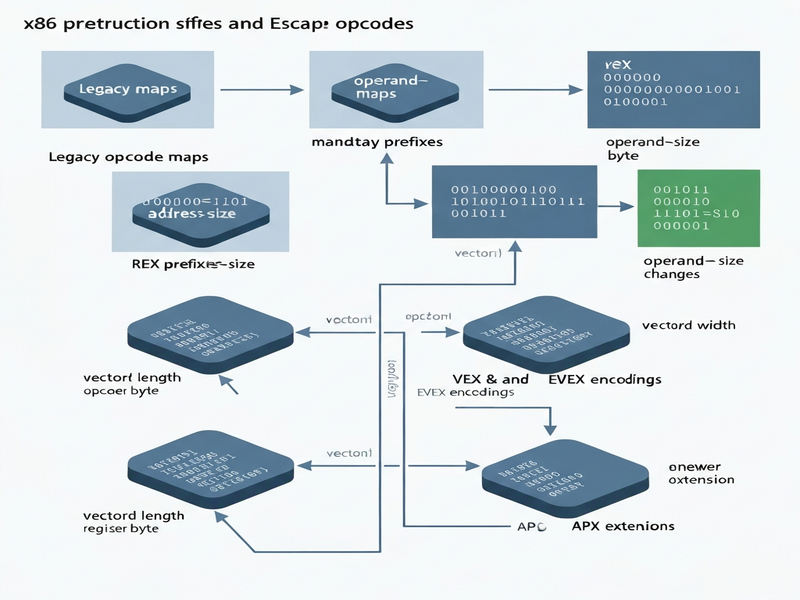
Why x86 Prefixes Matter in Modern Assembly Language
The x86 instruction set architecture (ISA) has evolved for over four decades, growing from a simple 16‑bit core to a sophisticated 64‑bit platform that powers today’s data‑center CPUs. Central to this evolution are x86 prefixes and escape opcodes, which act as “gateways” that unlock new functionality without breaking backward compatibility.
System programmers, compiler writers, and hardware enthusiasts must understand these prefixes to write efficient assembly, debug low‑level code, and design compilers that generate optimal machine code for AVX, AVX‑512, and future extensions.
Overview of x86 Prefix Categories
The x86 ISA defines several distinct prefix groups, each serving a specific purpose. They are processed in a strict order, which the CPU’s instruction flowchart enforces.
1. Legacy (One‑Byte) Prefixes
0xF0– LOCK (ensures atomicity on multi‑core systems).0xF2and0xF3– REPNE/REPE (string operation repeat prefixes).0x2E, 0x36, 0x3E, 0x26, 0x64, 0x65– segment override prefixes.0x66– operand‑size override (switches between 16‑ and 32‑bit operands).0x67– address‑size override (switches between 16‑ and 32‑bit addressing).
2. Mandatory Prefixes
These are required for certain SIMD instructions to indicate operand type:
0x66– packed double‑precision (e.g.,ADDPD).0xF2– scalar single‑precision (e.g.,ADDSD).0xF3– scalar double‑precision (e.g.,ADDSDwith different semantics).
3. REX Prefix (64‑bit Extension)
Introduced with AMD64, the REX prefix is a single byte in the range 0x40‑0x4F. Its bits extend register addressing and operand size:
| Bit | Name | Effect |
|---|---|---|
| W | Operand‑size | 64‑bit when set |
| R | Register extension | Adds a high‑order bit to the ModR/M reg field |
| X | Index extension | Adds a high‑order bit to the SIB index field |
| B | Base extension | Adds a high‑order bit to the SIB base field |
4. VEX Prefix (AVX Vector Extensions)
The VEX prefix replaces legacy prefixes for AVX (Advanced Vector Extensions) instructions. It can be 2‑byte (C5) or 3‑byte (C4) and encodes:
- Register extensions (R, X, B) – similar to REX but inverted.
- Vector length (L) – 0 for 128‑bit, 1 for 256‑bit.
- Mandatory prefix selector (pp) – encodes 0x66, 0xF2, 0xF3, or none.
- Opcode map selector (mm) – selects 0F, 0F38, or 0F3A maps.
5. EVEX Prefix (AVX‑512 Extensions)
EVEX is a 4‑byte prefix that expands VEX capabilities to support AVX‑512’s 512‑bit vectors, masking, broadcasting, and rounding control. Its fields include:
- R’, X’, B’, R – extended register bits (inverted).
- mm – opcode map (adds new maps for AVX‑512).
- W – operand‑size extension.
- vvvv – additional source register.
- pp – mandatory prefix selector.
- z – zero‑masking vs. merging.
- L’/L – vector length (128, 256, 512).
- b – broadcast/rounding control.
Escape Opcodes: The Bridge Between Prefixes and Core Operations
Escape opcodes are special byte sequences (most commonly 0x0F, 0x0F38, and 0x0F3A) that signal the CPU to interpret the following bytes using an extended opcode map. They work hand‑in‑hand with the prefix groups described above.
When an escape opcode is encountered, the decoder:
- Collects any preceding prefixes (legacy, mandatory, REX/VEX/EVEX).
- Identifies the escape byte(s) to select the appropriate opcode map.
- Applies the prefix‑encoded modifiers (operand size, vector length, masking, etc.).
- Executes the final opcode with the fully resolved semantics.
Step‑by‑Step Walk‑through of the x86 Instruction Flowchart
The flowchart for decoding x86 instructions can be visualized as a series of decision nodes. Below is a concise, MECE‑structured walk‑through that mirrors the diagram from the original source.
Step 1 – Prefix Collection
The decoder reads bytes sequentially, gathering any of the following:
- Legacy prefixes (LOCK, segment overrides, operand/address size).
- Mandatory prefixes (0x66, 0xF2, 0xF3) that dictate SIMD operand type.
- REX/VEX/EVEX prefixes if the next byte falls in the 0x40‑0x4F or 0xC4/0xC5 range.
Step 2 – Escape Opcode Detection
If the next byte is 0x0F, the decoder knows it must consult an extended map. A second byte may follow (0x38 or 0x3A) to select sub‑maps used by AVX and AVX‑512.
Step 3 – Opcode Map Selection
Based on the escape sequence and any mm bits encoded in VEX/EVEX, the decoder chooses one of the following maps:
- Map 0: Legacy (no escape).
- Map 1: 0F – classic two‑byte opcodes.
- Map 2: 0F 38 – AVX‑compatible extensions.
- Map 3: 0F 3A – further AVX‑512 extensions.
- Maps 4‑6: Reserved for future APX/EVEX extensions.
Step 4 – Operand‑type Resolution
The mandatory prefix (or the pp field in VEX/EVEX) determines whether the instruction operates on packed single, packed double, scalar single, or scalar double data types. This is why the same opcode can have multiple semantic variants.
Step 5 – Register & Operand Decoding
Using the ModR/M byte (and optional SIB byte), the decoder resolves:
- Destination register (or memory address).
- Source registers (including extra registers encoded by
vvvvin EVEX). - Scale‑index‑base addressing if present.
Step 6 – Execution with Extensions
Finally, the CPU executes the instruction, applying any of the following extensions if present:
- REX.W – forces 64‑bit operand size.
- VEX.L – selects 128‑ vs. 256‑bit vectors.
- EVEX.L’/L – selects 128/256/512‑bit vectors.
- EVEX.z – zero‑masking for masked operations.
- EVEX.b – broadcast or rounding control.
Practical Implications for Developers & Compiler Writers
Understanding the flowchart is not just academic—it directly influences performance, correctness, and portability.
1. Writing Hand‑Optimized Assembly
When hand‑coding, you must manually insert the correct prefix bytes. A missing 0x66 or an incorrect REX.W can silently produce wrong results or trigger illegal‑instruction exceptions on CPUs that lack the required extension.
2. Compiler Code Generation
Modern compilers (GCC, Clang, MSVC) generate VEX/EVEX prefixes automatically, but they rely on accurate target‑CPU feature detection. Mis‑detecting AVX‑512 support leads to binaries that crash on older hardware. Embedding the flowchart logic into compiler back‑ends helps ensure safe fallback paths.
3. Performance Tuning
Choosing the right vector length (L vs. L’) can double or quadruple throughput. For example, using a 512‑bit EVEX instruction on a CPU that only supports 256‑bit AVX will cause a #UD (invalid opcode) fault. Profilers that expose the exact prefix sequence help developers fine‑tune hot loops.
4. Security & Exploit Mitigation
Attackers sometimes craft malformed prefix sequences to bypass disassembly tools. Understanding the exact decoding order enables security engineers to write more robust static analysis rules.
Leveraging UBOS AI Tools to Visualize and Test x86 Prefixes
UBOS offers a suite of AI‑powered platforms that can accelerate low‑level development workflows:
- Explore the UBOS platform overview to spin up a sandboxed environment for assembly experimentation.
- Use the Workflow automation studio to create pipelines that automatically assemble, disassemble, and benchmark code snippets with different prefix combinations.
- The Web app editor on UBOS lets you embed the AI SEO Analyzer to ensure your documentation stays searchable while you focus on low‑level details.
- For teams building AI‑assisted debugging assistants, the OpenAI ChatGPT integration can provide natural‑language explanations of complex prefix sequences.
Take the Next Step: Master x86 Prefixes with UBOS
If you’re a system programmer or a hardware enthusiast looking to deepen your mastery of the x86 ISA, UBOS provides the tools and community you need. Visit the UBOS homepage to explore tutorials, join the UBOS partner program, and discover pricing that fits startups or enterprises.
Ready to experiment? Start with the UBOS for startups plan, then scale to the Enterprise AI platform by UBOS as your needs grow.
For a visual representation of the flowchart discussed above, see the original flowchart article.