
Digma Code Observability MCP Server
A Model Context Protocol (MCP) server implementation for enabling agents to access observability insights using Digma for code observability and dynamic code analysis
Key Features 🚀
- 🗣️ Observability-assisted code reviews: Check the PR branch for any issues discovered by pre-prod observability.
- 🔎 Find code inefficiencies with dynamic code analysis: Identify issues in the code/queries that are slowing the app down
- 🔭 Utilize code runtime usage data from distributed tracing: Check for breaking changes or generated relevant tests
Example prompts 💬
help me review the code changes in this branch by looking at related runtime issuesI want to improve the performance of this app. What are the three most severe issues I can fix?I'm making changes to this function, based on runtime data. What other services and code would be affected?Are there any new issues in this code based on the Staging environment?Which database queries have the most impact on the application performance?
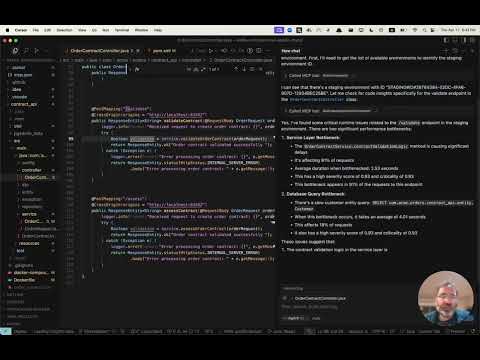
See it in action 📺
Get early access 👀
Digma pre-processes your observability data to identify issues, track code performance and runtime data - for dynamic code analysis. Visit our MCP page to sign up for early access to our MCP server.
Installation ⚙️
Configure your MCP Client (Claude, Cursor, etc.) to include the Digma MCP.
The Digma deployment includes the MCP SSE server. You can configure it using its URL in your client, or use an MCP tool such as SuperGateway to run it as a command tool.
The MCP URL path is composed of the Digma API Key as follows:
https://<DIGMA_API_URL>/mcp/<DIGMA_API_TOKEN>>/sse
Example MCP XML
If your client supports SSE servers, you can use the following syntax:
{
  "mcpServers": {
    "digma": {
    "url": "https://<DIGMA_API_URL>/mcp/DIGMA_API_TOKEN>/sse",

      }
    // ... other servers might be here ...
  }
}
To use the MCP server as a command tool, use the SuperGateway tool to bridge to the URL as seen below:
{
  "digma": {
    "command": "npx",
    "args": [
      "-y",
      "supergateway",
      "--sse",
      "https://<DIGMA_API_URL>/mcp/DIGMA_API_TOKEN>/sse"
    ]
  }
}
Using rules 👨💼
The agent is autonomous and selects when to use the data provided by Digma as needed, however, some clients allow setting rules and policies to set a more structured process.
Here is an example rules file which you can add to your cursor .cursor/rules directory
# Digma Memory File - Code Review Instructions

## Runtime Analysis Settings
- Environment: TEST

## Code Review Protocol
1. For any code or branch review request:
   - Get the list of changed files and methods in the current branch using `git diff`
   - Check for ALL runtime issues in TEST environment (not just for the method in context)
   - Check if any runtime issue may be related to the changed code
   - Check the runtime usage of the changed methods (based on the `git diff`)
   - Check if any of the changed methods (based on the `git diff`) have a high risk based on their performance impact
   - Synthesize the data with standard code review analysis


## Note
This file is used by the AI assistant to maintain consistent review protocols across sessions.
License 📜
MIT License. See LICENSE file.
Digma Code Observability Server

Project Details
- digma-ai/digma-mcp-server
- Last Updated: 5/12/2025
Recomended MCP Servers
这是一个针对于MySQL开发的MCP,该项目旨在帮助用户快速且精确的查询MySQL数据库中的内容
MCP Server for Interacting with Cube Semantic Layers
Model Context Protocol Servers
An MCP server implementation that provides tools for interacting with the [Telegram Bot API](https://core.telegram.org/bots/api).
一个能与Cursor集成的图片生成mcp server工具,实现调用即梦逆向接口
A WooCommerce (MCP) Model Context Protocol server
query table from some websites, support MCP
MCP DevTools: A suite of Model Context Protocol servers enabling AI assistants to interact with developer tools and...
Интеграция Claude с Trello через MCP Server на Smithery.ai
🔍 Enable AI assistants to search, access, and analyze PubMed articles through a simple MCP interface.
Featured Templates
View More





