

- Updated: August 14, 2026
- 7 min read
Looks Right, Works Right: A Project-Level Benchmark for Multi-Screen Mobile App Generation
Direct Answer
MobileForge is the first benchmark that evaluates how well multimodal large language models (LLMs) can generate complete, multi‑screen mobile applications from visual designs. It matters because it shifts the focus from isolated screen‑to‑code snippets to end‑to‑end, buildable projects that include navigation, shared components, and maintainable code—requirements that real‑world mobile products demand.
Background: Why This Problem Is Hard
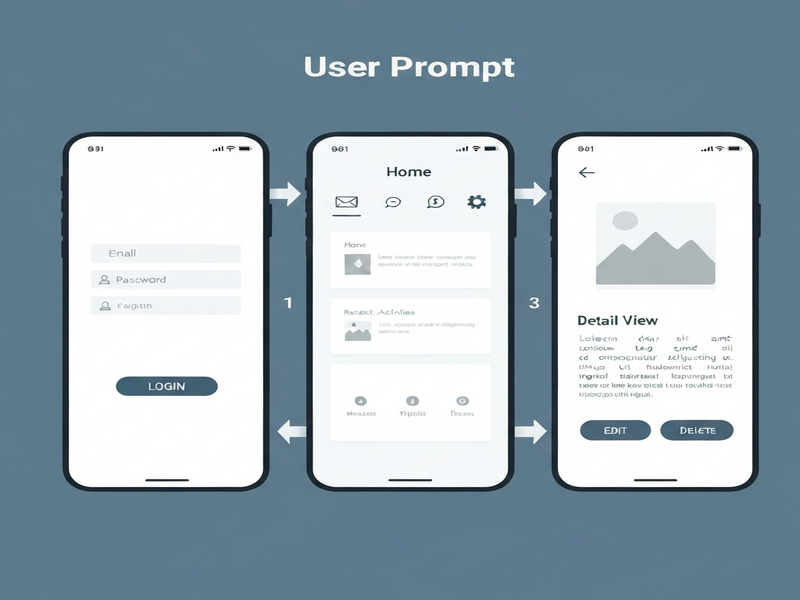
Design‑to‑code research has made impressive strides, with multimodal LLMs turning a single mockup into runnable UI code. Yet, commercial mobile apps rarely consist of a single screen. They involve:
- Multiple inter‑connected pages that share widgets, styles, and navigation logic.
- Stateful flows where a user’s actions on one screen affect the next.
- Long‑term maintainability concerns such as modular architecture and naming conventions.
Existing benchmarks, such as UI‑to‑Code or single‑page generation suites, ignore these dimensions. They cannot:
- Measure whether generated code compiles into a cohesive project.
- Validate cross‑page navigation paths.
- Assess the readability or extensibility of the produced source.
Consequently, a model that scores high on a single‑screen test may still fail to deliver a functional app when developers try to stitch several screens together. The gap between research prototypes and production‑ready tooling remains a critical bottleneck for AI‑assisted app development.
What the Researchers Propose
The authors introduce MobileForge, a project‑level benchmark that captures the full lifecycle of multi‑screen mobile app generation. Its core contributions are:
- Real‑world app corpus: A curated set of open‑source mobile applications, each broken down into individual screens.
- Human‑reviewed design assets: High‑resolution screenshots paired with precise UI annotations.
- Structured page‑relationship graph: Explicit links that describe navigation edges, shared components, and data flow between screens.
- Navigation test specifications: Automated scripts that simulate user interactions to verify that generated apps reach the intended destinations.
MobileForge evaluates models along five orthogonal axes:
- Build Success – Does the generated project compile without errors?
- Navigation Correctness – Can a simulated user traverse the intended paths?
- Visual Fidelity – How closely does the rendered UI match the source design?
- Code Maintainability – Are naming, modularity, and documentation standards met?
- Efficiency – What is the computational cost (tokens, inference time) of producing the full project?
How It Works in Practice
Conceptual Workflow
MobileForge defines a repeatable pipeline that any multimodal LLM can plug into:
- Design Ingestion: The model receives a set of ordered screenshots and optional textual annotations.
- Screen‑Level Code Generation: For each screenshot, the model emits platform‑specific UI code (e.g., Flutter/Dart, SwiftUI, Jetpack Compose).
- Cross‑Screen Integration: Using the page‑relationship graph, the model stitches individual screens together, creating shared component libraries and navigation routes.
- Project Assembly: All generated files are placed into a standard project scaffold (e.g., Android Studio or Xcode project structure).
- Automated Validation: A CI‑style harness compiles the project, runs navigation tests, and captures visual diffs.
Component Interaction
The benchmark treats the LLM as a black‑box “code‑synthesis agent” that interacts with three auxiliary services:
- Design Parser: Extracts layout hierarchies, color palettes, and component metadata from the screenshots.
- Navigation Engine: Executes state‑isolated test scripts, ensuring that a failure on one path does not cascade to others.
- Visual Judge: An anchor‑referenced, list‑wise evaluation module that ranks generated screens against ground‑truth images, improving reliability over pairwise comparisons.
What sets MobileForge apart is the state‑isolated navigation testing strategy. Instead of a single end‑to‑end run that can be derailed by an early error, each navigation edge is exercised in a fresh sandbox, providing granular failure diagnostics.
Evaluation & Results
Test Scenarios
The authors ran end‑to‑end experiments on six cutting‑edge multimodal LLMs, including GPT‑4‑Vision, Claude‑3‑Opus, and open‑source alternatives. Each model was tasked with generating the full project for every app in the MobileForge corpus.
Key Findings
- Build Success: All six models produced compilable code for roughly 70 % of the apps, indicating that current LLMs can handle most syntax and dependency requirements.
- Navigation Correctness: Only 35 % of the generated projects passed the full navigation suite. Errors were often due to missing route declarations or mismatched parameter names.
- Visual Fidelity: Using the anchor‑referenced visual judge, average similarity scores hovered around 0.68 (on a 0–1 scale), showing noticeable gaps in spacing, font weight, and widget hierarchy.
- Maintainability: Automated static analysis revealed that naming conventions and component modularity fell short of industry standards in 60 % of cases.
- Efficiency: Token consumption scaled linearly with the number of screens, but inference latency varied widely across models, with open‑source LLMs taking up to three times longer than proprietary counterparts.
Interpretation of Results
These outcomes paint a nuanced picture:
- Current multimodal LLMs are competent at generating syntactically correct UI code, but they lack a holistic understanding of app‑wide navigation logic.
- Visual fidelity remains a secondary concern; models often misinterpret subtle design cues that affect user experience.
- Maintainability metrics suggest that models treat each screen as an isolated artifact rather than part of a reusable component ecosystem.
Collectively, the results validate MobileForge as a stress test for the next generation of AI‑driven development tools.
Why This Matters for AI Systems and Agents
For AI practitioners building autonomous agents, MobileForge offers a concrete yardstick to measure “project‑level competence.” An agent that can only produce one‑off snippets will falter when tasked with end‑to‑end productization. The benchmark’s five‑axis rubric aligns directly with the capabilities required by:
- AI‑augmented IDEs: Tools that need to generate, compile, and debug full projects on the fly.
- Low‑code platforms: Services that promise “design‑to‑app” pipelines for non‑technical users.
- Enterprise automation suites: Systems that orchestrate code generation as part of larger workflows, such as continuous integration pipelines.
Integrating MobileForge into an agent’s evaluation loop can surface navigation‑specific failures early, allowing developers to inject corrective prompts or fallback strategies. Moreover, the benchmark’s maintainability score encourages agents to adopt best‑practice patterns—an essential step toward trustworthy AI‑generated code.
For organizations looking to adopt AI‑driven app creation, the UBOS platform overview demonstrates how a modular AI stack can consume benchmark feedback to continuously improve code synthesis pipelines.
What Comes Next
While MobileForge marks a significant advance, several open challenges remain:
- Dynamic Data Handling: Current tests assume static UI flows. Future extensions should incorporate API integration and state management.
- Cross‑Platform Consistency: Evaluating whether a model can generate equivalent iOS and Android projects from the same design set.
- Human‑in‑the‑Loop Refinement: Designing interfaces where developers can iteratively correct navigation or naming errors without restarting the entire generation process.
- Benchmark Expansion: Adding more diverse app categories (e.g., AR/VR, wearables) to stress‑test domain‑specific UI patterns.
Addressing these gaps will likely involve tighter integration between LLMs and symbolic reasoning engines, as well as richer multimodal training data that captures navigation semantics. Researchers interested in contributing to the benchmark can explore the MobileForge GitHub repository for data download and evaluation scripts.
Businesses that want to experiment with AI‑generated mobile apps can start with the Enterprise AI platform by UBOS, which already supports plug‑in models for design‑to‑code conversion and can be extended to meet MobileForge’s evaluation criteria.
References
- Wu, F., Gao, C., Huang, Y., Xiao, Y., Chen, Y., & Liao, Q. (2026). Looks Right, Works Right: A Project‑Level Benchmark for Multi‑Screen Mobile App Generation. arXiv preprint arXiv:2607.28645.
- OpenAI. (2024). OpenAI ChatGPT integration.
- UBOS. (2026). About UBOS.
Andrii Bidochko
CTO UBOS
Andrii Bidochko is an AI entrepreneur and researcher focused on AI agents, reinforcement learning, and autonomous systems. He writes about the technologies shaping the future of machine intelligence, from frontier models and agent architectures to real-world AI applications.