

- Updated: March 12, 2026
- 6 min read
Integrating OpenClaw with Discord: Setup, Bot Configuration, and Security Best Practices
Integrating OpenClaw with Discord involves installing OpenClaw, creating a Discord bot, securely handling its token, and wiring the bot to OpenClaw’s webhook endpoints—all in a few straightforward steps.
1. Introduction
OpenClaw is a powerful, open‑source automation engine that can trigger actions from virtually any source. Pairing it with Discord gives development teams real‑time alerts, command‑driven workflows, and a collaborative chat‑ops experience. This guide walks developers and system administrators through the entire setup—from prerequisites to security hardening—so you can launch a production‑ready Discord‑OpenClaw bridge in under an hour.
2. Prerequisites
- Linux or macOS workstation with
gitanddockerinstalled. - Node.js ≥ 18 (for the Discord bot) and
npmoryarn. - A Discord account with Manage Server permissions.
- OpenClaw source code (available on GitHub) or a Docker image.
- Basic knowledge of REST APIs and environment variables.
If you already use UBOS for other AI projects, you might want to explore the UBOS platform overview for a unified management console.
3. Setting up OpenClaw
OpenClaw can be run directly from source or via Docker. The Docker route isolates dependencies and simplifies networking with Discord.
3.1 Clone the repository
git clone https://github.com/openclaw/openclaw.git
cd openclaw
3.2 Build and start the container
docker build -t openclaw:latest .
docker run -d \
  -p 8080:8080 \
  -e OPENCLAW_ENV=production \
  --name openclaw \
  openclaw:latest
OpenClaw’s REST API will now be reachable at http://localhost:8080/api. Verify the health endpoint:
curl http://localhost:8080/api/healthFor a visual workflow builder, check out the Workflow automation studio, which can import OpenClaw definitions directly.
4. Creating a Discord bot
Discord bots are registered through the Discord Developer Portal. Follow these steps:
- Navigate to Discord Developer Portal and click “New Application”.
- Name the application (e.g., “OpenClaw Bridge”) and save.
- In the left sidebar, select **Bot**, then click “Add Bot”. Confirm the prompt.
- Under **Privileged Gateway Intents**, enable MESSAGE CONTENT INTENT if you plan to parse user messages.
- Copy the **Bot Token** – you’ll need it in the next section.
- Invite the bot to your server using the OAuth2 URL Generator (scopes:
bot, permissions:Send Messages, Read Message History).
If you need a quick starter for bot code, the AI Chatbot template provides a ready‑made Node.js skeleton.
5. Bot token handling
Never hard‑code the token in source files. Use environment variables and a secrets manager (e.g., Docker secrets, HashiCorp Vault, or ChatGPT and Telegram integration for encrypted storage).
5.1 .env file example
# .env
DISCORD_BOT_TOKEN=YOUR_DISCORD_BOT_TOKEN_HERE
OPENCLAW_WEBHOOK_URL=http://localhost:8080/api/webhook/discord
5.2 Loading the token in Node.js
require('dotenv').config();
const { Client, Intents } = require('discord.js');

const client = new Client({ intents: [Intents.FLAGS.GUILDS, Intents.FLAGS.GUILD_MESSAGES] });

client.login(process.env.DISCORD_BOT_TOKEN)
  .then(() => console.log('✅ Bot logged in'))
  .catch(err => console.error('❌ Login failed:', err));
When deploying with Docker, pass the .env file as a secret:
docker run -d \
  --name openclaw-discord-bot \
  --env-file .env \
  node:18-alpine node bot.js
6. Integrating the bot with OpenClaw
OpenClaw can call external URLs via its Webhook Action. The Discord bot will listen for specific commands and forward them to OpenClaw, while OpenClaw can push notifications back to Discord.
6.1 Bot command listener
client.on('messageCreate', async (message) => {
  // Ignore bot messages
  if (message.author.bot) return;

  // Simple command: !run
  if (message.content.startsWith('!run')) {
    const [, workflowId] = message.content.split(' ');
    try {
      const response = await fetch(`${process.env.OPENCLAW_WEBHOOK_URL}/${workflowId}`, {
        method: 'POST',
        headers: { 'Content-Type': 'application/json' },
        body: JSON.stringify({ discordUser: message.author.id })
      });
      const data = await response.json();
      message.reply(`✅ Workflow ${workflowId} triggered: ${data.status}`);
    } catch (err) {
      console.error(err);
      message.reply('❌ Failed to trigger workflow.');
    }
  }
});
6.2 OpenClaw webhook endpoint
Expose a simple Express route (or use OpenClaw’s built‑in webhook feature) that receives the Discord payload and starts the desired workflow.
app.post('/api/webhook/discord/:workflowId', async (req, res) => {
  const { workflowId } = req.params;
  const { discordUser } = req.body;

  // Trigger the workflow via OpenClaw SDK
  const result = await openclaw.runWorkflow(workflowId, { discordUser });
  res.json({ status: result.success ? 'started' : 'error' });
});
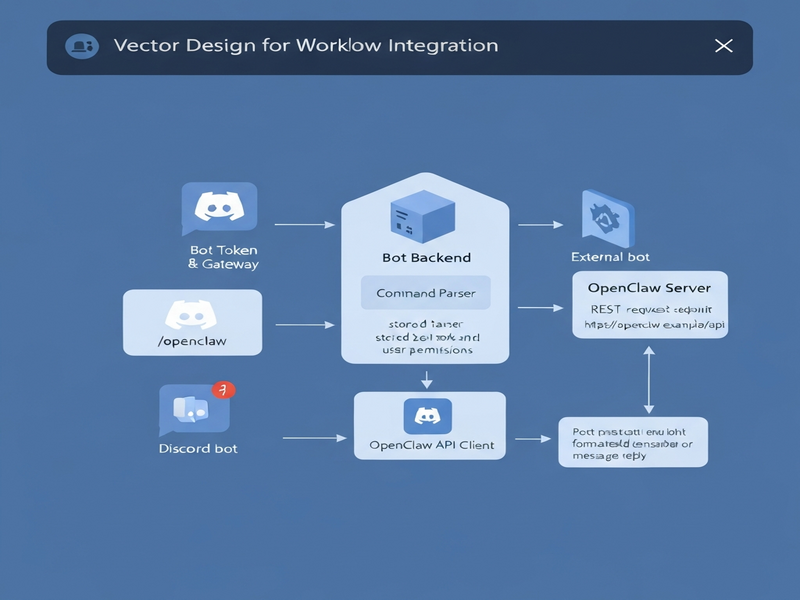
For a visual example of how the data flows, see the diagram below (replace with your own image when ready):
If you need a ready‑made template for rapid prototyping, the GPT-Powered Telegram Bot can be adapted to Discord with minimal changes.
7. Security best practices
Integrating a chat platform with an automation engine opens attack surfaces. Follow these hardened guidelines:
- Least‑privilege token scopes: Only grant
Send MessagesandRead Message Historyunless additional capabilities are required. - Rotate tokens regularly: Use a CI/CD pipeline to generate a fresh token every 30 days and update the
.envfile automatically. - Validate incoming payloads: Verify the
discordUserfield against a whitelist or use Discord’s signed request verification. - Encrypt secrets at rest: Store
DISCORD_BOT_TOKENin a vault (e.g., HashiCorp Vault, AWS Secrets Manager) and inject it at runtime. - Rate‑limit API calls: Implement a per‑user throttling layer in the bot to prevent abuse of the OpenClaw webhook.
- Network isolation: Run the bot and OpenClaw in separate Docker networks; expose only the webhook endpoint to the bot’s network.
- Audit logging: Enable OpenClaw’s audit trail and forward Discord command logs to a SIEM for forensic analysis.
For a broader security framework, consider the Enterprise AI platform by UBOS, which includes built‑in role‑based access control and secret management.
8. Conclusion
By following this step‑by‑step guide, you’ve transformed OpenClaw into a Discord‑aware automation hub. The combination of a securely stored bot token, a lightweight webhook bridge, and strict security controls ensures a resilient, production‑grade integration. Whether you’re a startup building a dev‑ops alert channel or an enterprise scaling chat‑ops across dozens of teams, the pattern described here scales effortlessly.
Ready to explore more AI‑driven integrations? Dive into the AI marketing agents for automated campaign management, or check out the UBOS pricing plans to find a tier that matches your growth.
For further reading, the original news article that sparked this tutorial can be found here.
Andrii Bidochko
CTO UBOS
Andrii Bidochko is an AI entrepreneur and researcher focused on AI agents, reinforcement learning, and autonomous systems. He writes about the technologies shaping the future of machine intelligence, from frontier models and agent architectures to real-world AI applications.