

- Updated: March 12, 2026
- 6 min read
Deploying OpenClaw on Kubernetes with Helm: Step‑by‑Step Guide
Deploying OpenClaw on Kubernetes with Helm can be achieved in a systematic, repeatable process that covers architecture design, Helm chart creation, secret handling, TLS configuration, monitoring integration, and scaling best practices.
Introduction
OpenClaw is a powerful, open‑source web‑crawler and data‑extraction engine that many enterprises embed into their data pipelines. Running it on Kubernetes gives you high availability, automated roll‑outs, and effortless scaling. Helm, the de‑facto package manager for Kubernetes, lets you codify the entire deployment as a reusable chart.
In this step‑by‑step guide we’ll walk through everything you need to launch a production‑grade OpenClaw instance on a Kubernetes cluster, from the initial architecture sketch to advanced monitoring and scaling tricks. Whether you’re a startup experimenting with data enrichment or an enterprise looking to integrate OpenClaw into a larger AI platform, the patterns described here are MECE‑compliant and ready for real‑world use.
Architecture Overview
The core components of an OpenClaw deployment on Kubernetes are:
- OpenClaw Service – the crawler engine, containerized and stateless.
- Redis Queue – holds crawl jobs and coordinates workers.
- PostgreSQL Database – persists extracted data and metadata.
- Ingress Controller – exposes the UI and API over HTTPS.
- Prometheus & Grafana – collect metrics and visualize health.
The diagram below visualizes the interaction between these components. It also highlights where you can plug in OpenAI ChatGPT integration for AI‑enhanced data parsing, or add Chroma DB integration for vector search capabilities.
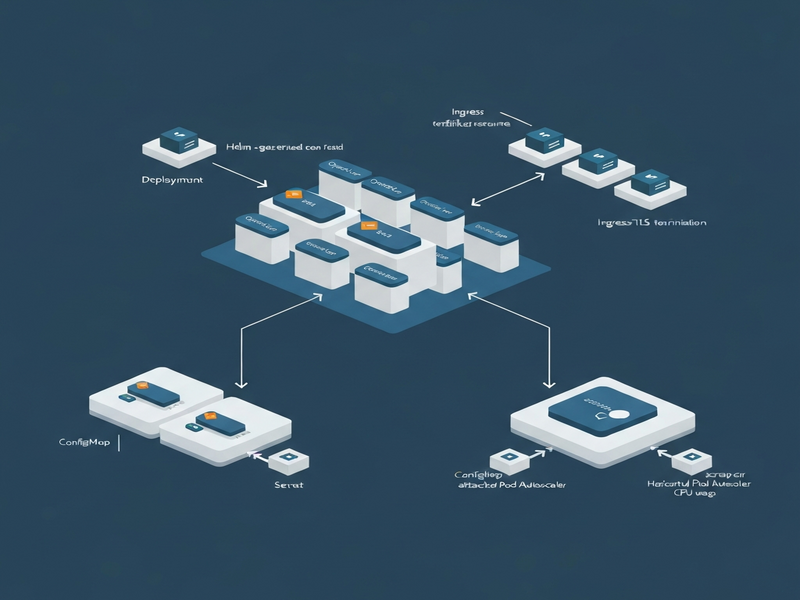
For teams already using the UBOS platform overview, this architecture can be extended with the Workflow automation studio to orchestrate downstream AI agents, such as AI marketing agents that automatically enrich leads with crawled data.
Helm Chart Creation
Helm charts encapsulate Kubernetes manifests, values, and templates. Follow these steps to scaffold a clean chart for OpenClaw.
1. Initialize the Chart
helm create openclaw2. Define the Core Templates
Replace the default deployment.yaml with a container spec that pulls the official OpenClaw image (e.g., openclaw/openclaw:latest). Set resource requests and limits to match your SLA.
3. Parameterize Secrets and ConfigMaps
Expose environment variables for Redis and PostgreSQL connections via values.yaml. Use Helm’s lookup function to reference existing secrets (see the Secret Management section).
4. Add Ingress with TLS
Configure an Ingress resource that points to the OpenClaw service. The tls block will be populated by the TLS Setup step.
5. Package and Test
helm lint ./openclaw
helm package ./openclaw
helm install openclaw ./openclaw-0.1.0.tgz --namespace data-pipeline
Once the chart is stable, you can publish it to your internal Helm repository or the UBOS templates for quick start marketplace, where other teams can reuse it.
Secret Management
Storing credentials securely is non‑negotiable. Kubernetes offers Secret objects, but for production you should integrate with a secret manager such as HashiCorp Vault, AWS Secrets Manager, or Azure Key Vault.
Create Kubernetes Secrets
kubectl create secret generic openclaw-db \
  --from-literal=postgres_user=admin \
  --from-literal=postgres_password=SuperSecret123 \
  --namespace=data-pipeline
Reference Secrets in Helm
In values.yaml add:
postgres:
  existingSecret: openclaw-db
  userKey: postgres_user
  passwordKey: postgres_password
When the chart renders, Helm will inject the secret values as environment variables. For dynamic rotation, pair this with ChatGPT and Telegram integration to receive real‑time alerts whenever a secret is rotated.
TLS Setup
Secure communication is essential for both the UI and API endpoints. You have two common paths: using a managed certificate service (e.g., cert‑manager with Let’s Encrypt) or importing your own TLS assets.
Option 1 – cert‑manager (recommended)
- Install cert‑manager via Helm:
- Create a
Certificateresource for your domain: - Reference the secret in your Ingress:
helm repo add jetstack https://charts.jetstack.io
helm install cert-manager jetstack/cert-manager \
  --namespace cert-manager --create-namespace \
--version v1.12.0 --set installCRDs=trueapiVersion: cert-manager.io/v1
kind: Certificate
metadata:
name: openclaw-tls
namespace: data-pipeline
spec:
secretName: openclaw-tls-secret
dnsNames:
- openclaw.example.com
issuerRef:
name: letsencrypt-prod
kind: ClusterIssuertls:
- hosts:
- openclaw.example.com
secretName: openclaw-tls-secretOption 2 – Manual TLS
If you already own a certificate, create a secret:
kubectl create secret tls openclaw-manual-tls \
  --cert=tls.crt --key=tls.key \
  -n data-pipeline
Then point the Ingress secretName to openclaw-manual-tls. For teams leveraging the ElevenLabs AI voice integration, you can expose a secure voice‑controlled endpoint that authenticates via TLS client certificates.
Monitoring Integration
Visibility into crawl performance, queue depth, and system health is vital. OpenClaw already emits Prometheus metrics; you just need to scrape them and visualize the data.
Prometheus Scrape Configuration
scrape_configs:
  - job_name: 'openclaw'
    static_configs:
      - targets: ['openclaw-service.data-pipeline.svc.cluster.local:9090']
Grafana Dashboard
Import a community dashboard (e.g., ID 1860) and add panels for:
- Crawl job latency
- Redis queue length
- PostgreSQL write throughput
- CPU / Memory usage per pod
To enrich alerts, connect Grafana to the Telegram integration on UBOS. When a metric crosses a threshold, a Telegram bot can push a notification to the ops channel.
AI‑Powered Observability
Leverage the Enterprise AI platform by UBOS to feed raw metrics into a large‑language‑model that automatically generates root‑cause analysis reports. This can be combined with the AI SEO Analyzer to surface SEO‑related crawl failures.
Scaling Tips
OpenClaw’s stateless design makes horizontal scaling straightforward. Below are proven tactics to keep performance linear as load grows.
1. Autoscale the Worker Pods
apiVersion: autoscaling/v2
kind: HorizontalPodAutoscaler
metadata:
  name: openclaw-worker
  namespace: data-pipeline
spec:
  scaleTargetRef:
    apiVersion: apps/v1
    kind: Deployment
    name: openclaw-worker
  minReplicas: 2
  maxReplicas: 20
  metrics:
  - type: Resource
    resource:
      name: cpu
      target:
        type: Utilization
        averageUtilization: 70
2. Partition the Redis Queue
Use multiple Redis streams (e.g., high‑priority, standard) and assign dedicated worker pools. This prevents a single slow crawl from throttling the entire system.
3. Database Connection Pooling
Configure the PostgreSQL driver with a connection pool size that matches the maximum number of concurrent workers. Tools like AI Article Copywriter can generate the required SQL snippets automatically.
4. Leverage Spot Instances
For cost‑sensitive workloads, run worker nodes on spot/preemptible VMs. Pair this with a Web Scraping with Generative AI template that gracefully retries failed jobs.
5. Use the UBOS Partner Program
If you need dedicated support for scaling at enterprise level, consider joining the UBOS partner program. Partners receive priority access to custom Helm charts, advanced monitoring packs, and SLA‑backed consulting.
Conclusion
Deploying OpenClaw on Kubernetes with Helm transforms a complex crawler into a resilient, observable, and auto‑scalable service. By following the architecture blueprint, crafting a clean Helm chart, securing secrets and TLS, wiring up Prometheus/Grafana, and applying autoscaling patterns, you can deliver reliable data extraction at any scale.
For further inspiration, explore the UBOS portfolio examples where similar pipelines power AI‑enhanced marketing, compliance, and research workloads. Need a quick start? Grab a ready‑made template from the UBOS templates for quick start library, such as the AI Video Generator or the AI Chatbot template, and adapt it to your OpenClaw use case.
Ready to launch? Visit the UBOS homepage for the latest Helm chart releases, pricing details, and community support channels.
For a deeper dive into the original announcement of OpenClaw’s Kubernetes support, see the news article.
Andrii Bidochko
CTO UBOS
Andrii Bidochko is an AI entrepreneur and researcher focused on AI agents, reinforcement learning, and autonomous systems. He writes about the technologies shaping the future of machine intelligence, from frontier models and agent architectures to real-world AI applications.